WordPress.com vs Hostinger Managed WordPress Hosting: Which Should You Buy?
WordPress.com vs Hostinger managed WordPress hosting is the decision most new site owners face when they want a real WordPress site but are unsure whether to stay inside the WordPress.com platform or buy self hosted WordPress.org on a managed host. Both paths can publish a blog or business site, but they are built for different levels of control and different long term costs.
WordPress.com is the all in one hosted platform from Automattic. You pick a plan, build inside their environment, and they handle infrastructure. Plugin access, custom themes, and ecommerce tools depend on which WordPress.com tier you pay for.
Hostinger managed WordPress hosting is different. You get standard WordPress.org software on Hostinger infrastructure with one click install, free SSL, caching, and hPanel tools. Premium and Business style plans are the usual picks when buyers want plugin freedom without managing a raw server.
The short answer: buy WordPress.com if you want maximum simplicity and can live inside plan limits. Buy Hostinger managed WordPress hosting if you want full WordPress.org freedom, lower long term control, and room to grow with any plugin or theme you choose.

WordPress.com wins all in one simplicity. Hostinger managed WordPress hosting wins plugin freedom and long term control.
What WordPress.com Actually Is
WordPress.com is not the same thing as WordPress.org software alone. It is a hosted service that runs WordPress for you inside Automattic rules. Your site lives on their platform, and your plan decides what you can install, customize, and monetize.
Lower WordPress.com tiers focus on writing and basic design. You get themes from their library, built in stats, and automatic updates without touching hosting settings. That simplicity is genuine value for people who only want to publish posts and never touch code.
Higher WordPress.com tiers unlock more power. Plugin access, custom themes, and advanced ecommerce features usually require paid upgrades. The jump from a simple blog plan to a business capable plan is where WordPress.com pricing starts to compete less favorably with self hosted WordPress.org on affordable hosts.
WordPress.com also uses its own onboarding and editor experience. For some beginners that feels cleaner than learning hPanel and DNS. For others the plan ceiling arrives quickly once they need a specific SEO plugin, a custom membership tool, or WooCommerce extensions that WordPress.com restricts on lower tiers.
WordPress.com is best understood as a productized website platform with WordPress inside it. You are buying convenience and guardrails, not open ended WordPress.org ownership. That trade is fair when your needs stay inside what the plan allows.
What Hostinger Managed WordPress Hosting Is
Hostinger managed WordPress hosting means WordPress.org installed on Hostinger servers with tools that handle the hard parts for you. You still own the site files, database, and plugin choices. The host manages server tuning, one click setup, SSL, and WordPress friendly caching.
On Hostinger, Single, Premium, and Business are the common WordPress hosting tiers buyers compare. Premium fits most blogs and small business sites because it supports multiple websites and often includes free domain eligibility on qualifying annual terms. Business adds staging, stronger backup behavior, and more headroom for WooCommerce style workloads. Compare Hostinger managed WordPress hosting plans at live checkout.
Managed here does not mean a fully closed platform like WordPress.com. It means the host optimizes the stack and gives you a dashboard for installs, domains, email, and backups. You install plugins from the WordPress.org directory or upload custom code when your project needs it.
hPanel is the daily control center. Connect a domain, run the WordPress installer, turn on SSL, and create email mailboxes without SSH access. That is why Hostinger managed WordPress hosting works for beginners who still want real WordPress.org freedom later.
For a deeper look at what managed means on Hostinger specifically, our managed WordPress hosting Hostinger guide walks through plan features, setup steps, and who each tier fits before you open checkout.
If you want the full Hostinger WordPress hosting picture in one place, open the live Hostinger managed WordPress hosting plans page and compare Premium and Business side by side while promo pricing is active.
Side by Side Comparison Table
Use this WordPress.com vs Hostinger managed WordPress hosting table before you open either checkout page. It maps the factors that change the buy decision for most blogs and small business sites.
| Factor | WordPress.com | Best freedom Hostinger Managed WP |
|---|---|---|
| Software type | Hosted WordPress.com platform | Full WordPress.org |
| Plugin freedom | Limited on lower tiers | Standard plugins on Premium and Business |
| Setup ease | Simplest all in one path | Beginner friendly with hPanel |
| Custom themes and code | Restricted unless upgraded | Upload themes and child themes |
| Email and domain extras | Varies by WordPress.com plan | Email and domain options in hPanel |
| Long term cost control | Higher tiers for full features | Often lower for full WP.org stack |
| Best for | Absolute beginners, simple blogs | Blogs, business sites, WooCommerce growth |
Confirm live features and pricing on each checkout page. Plan names and limits can change by region and billing term.
When the table points you toward Hostinger, open managed WordPress hosting on Hostinger and match Premium or Business to your plugin and site count needs before you compare WordPress.com upgrade tiers.
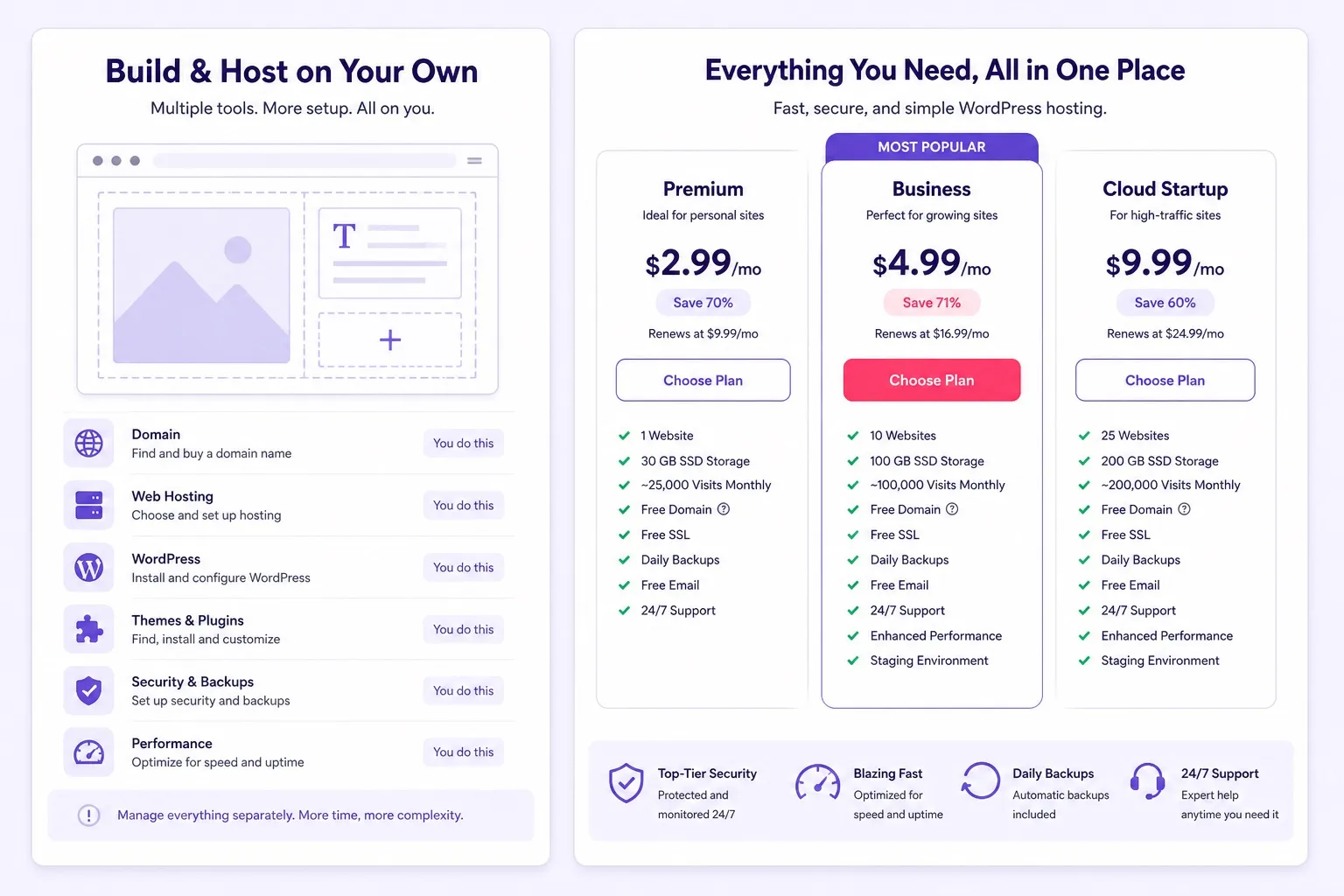
WordPress.com wins closed simplicity. Hostinger managed WordPress hosting wins open plugin and theme control.
Pricing and Renewals: What You Really Pay
Pricing is where WordPress.com vs Hostinger managed WordPress hosting stops being abstract. WordPress.com advertises monthly plans that rise as you unlock plugins, custom domains, and store tools. A simple personal blog can stay affordable. A site that needs full plugin access often lands on a higher WordPress.com tier with a higher monthly total.
Hostinger managed WordPress hosting advertises low promo rates on Premium and Business, especially on longer billing terms. Those intro prices usually rise at renewal, so the honest comparison writes down both the first term figure and the renewal figure on the same billing length before you buy.
WordPress.com can look simpler because one invoice covers platform and hosting together. Hostinger separates hosting from optional extras, but the WordPress.org stack you get is usually more flexible per dollar when you need plugins, custom themes, or WooCommerce extensions. Compare both stacks in our managed WordPress hosting Hostinger guide before you decide.
Do not compare marketing headlines alone. Open both checkouts, pick the same billing term, and note renewal price, domain eligibility, and whether email is included or extra. That two minute step prevents a cheap first month from becoming an expensive year two surprise. Compare Hostinger managed WordPress hosting plans at live checkout.
Check current Hostinger numbers on the live WordPress hosting pricing page and compare that total with the WordPress.com tier that actually unlocks the features you need, not the entry tier alone.
For a Hostinger only plan split when you are close to checkout, our Hostinger Premium vs Business post explains which tier fits blogs, business sites, and small stores before you pick a billing term.
Features: SSL, Domain, Email, Plugins, and Themes
Feature comparison is the core of WordPress.com vs Hostinger managed WordPress hosting. Both can run HTTPS. Both can connect a custom domain on paid plans. The difference is what you can change after the basics are live.
WordPress.com free SSL and domain behavior depend on plan level. Lower tiers may show WordPress.com branding or subdomain URLs until you upgrade. Plugin installation is not open on every tier, which matters the moment you need Yoast alternatives, caching plugins, or membership tools outside their approved list.
Hostinger WordPress hosting includes free SSL across plans. Free domain eligibility usually applies on qualifying annual Premium or Business terms, not every short billing length. Email mailboxes can be created in hPanel when your plan includes them, which keeps domain, site, and inbox in one account for many small business buyers.
Plugins and themes are the freedom gap. On Hostinger Premium and Business you install standard WordPress.org plugins and upload custom themes. That is normal WordPress behavior. On WordPress.com you pay more to reach comparable freedom, and some custom code paths still differ from self hosted WordPress.org.
WooCommerce is a common tipping point. A small catalog can run on Hostinger Business with staging and backup tools that help updates stay safe. WordPress.com ecommerce plans exist, but extension choice and total monthly cost should be compared honestly against self hosted WooCommerce on Hostinger before you commit.
If plugin freedom is your main reason to leave WordPress.com, compare tiers and buy Hostinger WordPress hosting on Premium or Business while current promo pricing is live. Confirm plan name, term, and renewal rate on the order summary.
Performance and Growth Headroom
Performance in WordPress.com vs Hostinger managed WordPress hosting depends on plan resources, caching, and how clean your site stays. WordPress.com handles infrastructure scaling inside their platform. You benefit from their global network without choosing server size yourself.
Hostinger uses LiteSpeed style caching and SSD storage on WordPress optimized plans. Quiet blogs and brochure sites feel fast with a light theme and modest plugins. Peak traffic and WooCommerce checkout load push you toward Business or later upgrades when resource meters stay high. Compare Hostinger managed WordPress hosting plans at live checkout.
Growth headroom favors Hostinger when your roadmap includes custom plugins, staging workflows, or store expansion. WordPress.com growth often means upgrading within their product ladder, which can cost more per month than a comparable self hosted stack once you need full plugin access.
Neither platform replaces site hygiene. Oversized images, heavy page builders, and too many plugins slow both environments. Hosting choice matters most after the site itself is reasonably optimized. Compare Hostinger managed WordPress hosting plans at live checkout.
A practical test is to load your homepage on mobile during your busiest hour, then compare with a quiet hour. If WordPress.com plan limits or Hostinger resource graphs show sustained pressure, upgrade timing is a hosting decision, not a design tweak alone.
Buyers planning WooCommerce or multi site work should open Hostinger Business WordPress hosting and confirm staging, backup, and resource details on the live plan page before peak season traffic arrives.
Who Should Buy WordPress.com
Buy WordPress.com if you are an absolute beginner who wants hosting and site management in one account with the fewest technical steps. You publish inside their platform and accept plan limits in exchange for simplicity.
Buy WordPress.com if your site is mostly writing, photography, or a simple brochure with no custom plugin roadmap. When the built in themes and blocks are enough, paying for full WordPress.org freedom may not return value. Compare Hostinger managed WordPress hosting plans at live checkout.
Buy WordPress.com if you prefer not to think about DNS, hPanel, or plugin updates at all. Their support model and guided onboarding fit people who treat the website as a writing tool first and a tech project second.
Skip WordPress.com if you already know you need WooCommerce extensions, membership plugins, or custom PHP code. Those needs usually arrive faster than expected, and migrating later takes time even when exports work cleanly. Compare Hostinger managed WordPress hosting plans at live checkout.
WordPress.com is a fair buy when your feature list fits inside an entry or mid tier plan today and you are comfortable upgrading inside their platform if needs grow slowly.
If you finish the WordPress.com pricing page and realize plugin access costs more than expected, compare Hostinger Premium WordPress hosting on the live checkout page before you lock in a higher WordPress.com tier.
Who Should Buy Hostinger Managed WordPress Hosting
Buy Hostinger managed WordPress hosting if you want standard WordPress.org behavior with affordable managed tools. Premium is the practical first buy for most blogs and small business sites that may run more than one website.
Buy Hostinger Business when staging, stronger backup behavior, or WooCommerce headroom matters. Stores and agencies benefit from testing plugin updates on staging before they touch the live site.
Buy Hostinger if long term plugin and theme control matters more than an all in one closed platform. SEO plugins, caching tools, form builders, and niche extensions install the way WordPress.org tutorials assume. Our Hostinger Premium vs Business guide helps you pick the tier that unlocks that freedom.
Buy Hostinger if free domain eligibility on a qualifying annual term and email in the same account are part of your launch budget. Confirm both extras on the live order summary because short billing terms may not qualify. Compare Hostinger managed WordPress hosting plans at live checkout.
First time owners who want a guided plan pick should read our WordPress hosting for beginners which Hostinger plan post before they choose Premium or Business at checkout.
When you are ready to move from research to purchase, compare tiers and claim Hostinger managed WordPress hosting while promo pricing remains active. Write down renewal price before you complete payment.
Common Mistakes to Avoid Before You Checkout
Choosing WordPress.com on the cheapest tier and expecting full plugin freedom later is a common mistake. Plugin access requires the right WordPress.com upgrade, and that upgrade cost should be compared with Hostinger Premium from the start.
Buying Hostinger Single when you already know you need three sites and staging is the opposite mistake. Premium or Business often costs less over time than juggling extra accounts or outgrowing entry limits in month three. Compare Hostinger managed WordPress hosting plans at live checkout.
Comparing only the first month promo without renewal price leads to bad decisions on both platforms. WordPress.com renewals and Hostinger renewals both need a full term view before you call either option affordable.
Treating WordPress.com and WordPress.org as the same product also causes regret. WordPress.com is a hosted platform with rules. Hostinger managed WordPress hosting is self hosted WordPress.org with managed server tools. Different products, different ceilings.
Ignoring migration cost is another error. Moving from WordPress.com to Hostinger later is doable, but redirects, media files, and plugin rebuilds take hours. If you already know you need open plugins, starting on Hostinger often saves a future migration weekend.
Our Hostinger WordPress hosting review covers daily performance, support experience, and plan limits so you can sanity check Hostinger before you leave WordPress.com behind.
Checkout Checklist Before You Pay
Run this checklist before you complete WordPress.com vs Hostinger managed WordPress hosting checkout. It takes a few minutes and prevents the wrong platform buy.
- Write your must have features: custom plugins, WooCommerce, staging, email, multiple sites
- Pick the WordPress.com tier that actually unlocks those features, not the entry tier alone
- Pick Hostinger Premium or Business based on site count and store needs
- Compare first term price and renewal price on the same billing length for both platforms
- Confirm free domain eligibility and free SSL rules on the Hostinger order summary
- Decide whether all in one simplicity or WordPress.org freedom matters more in year two
- Check whether email must live in the same account as hosting
- Choose one platform for the next 12 months based on current needs, not hypothetical growth alone
Most buyers who finish that list stop guessing. Simple bloggers often stay on WordPress.com. Owners who need plugins, custom themes, or WooCommerce usually pick Hostinger Premium or Business.
Ready to checkout on Hostinger? Open Hostinger WordPress hosting checkout and verify plan name, billing term, and Hostinger WordPress hosting review figure on the final screen before you pay.
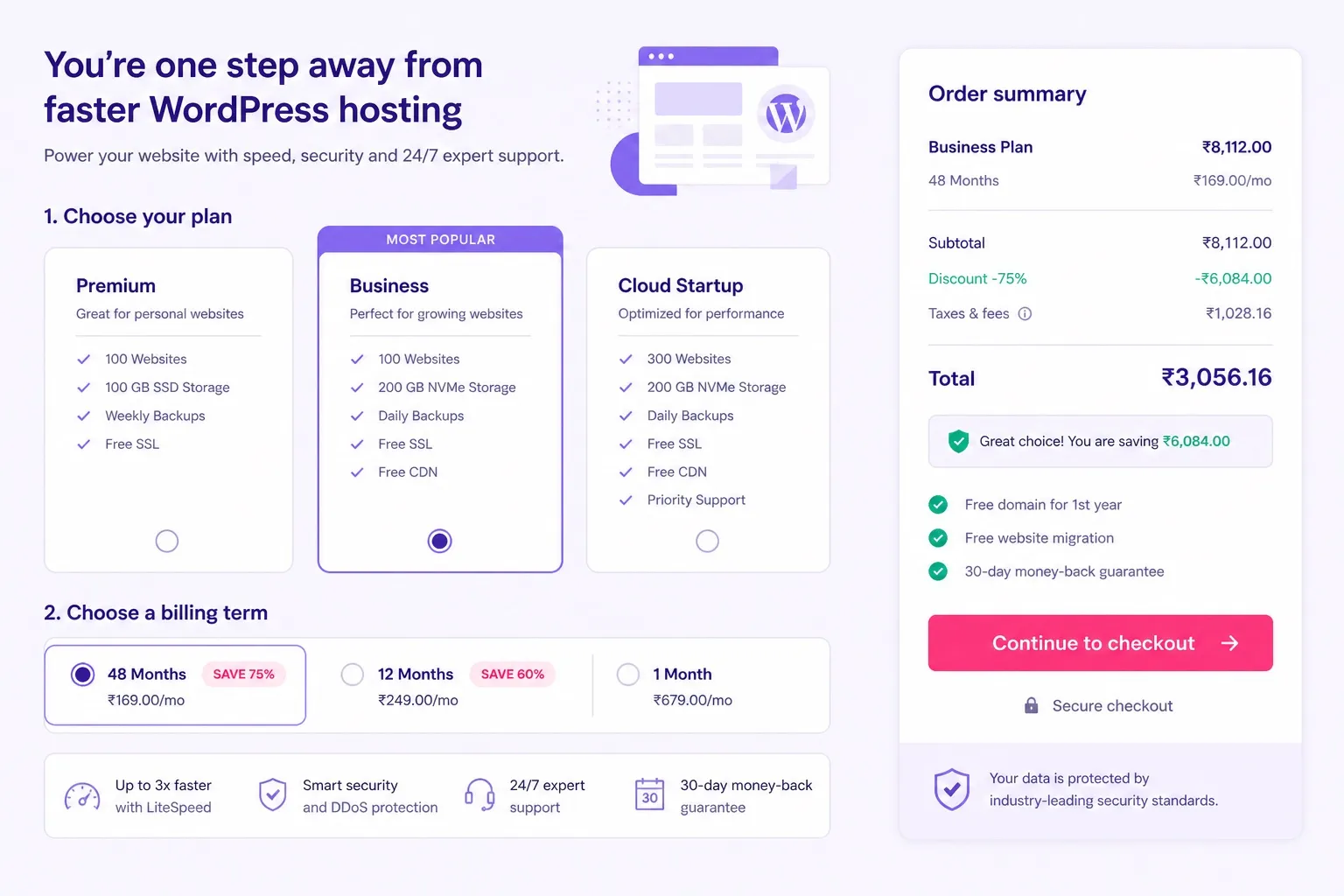
Confirm live pricing and renewal rates on checkout. Promo rules can change by region and billing term.
WordPress.com vs Hostinger Managed WordPress Hosting FAQ
These are the questions buyers ask most before choosing WordPress.com vs Hostinger managed WordPress hosting. Skim the ones that match your site type and checkout stage.
Is WordPress.com the same as WordPress.org?
No. WordPress.com is a hosted platform with its own plan rules and feature limits. WordPress.org is the open source software you install on hosting you control. Hostinger managed WordPress hosting runs WordPress.org with full plugin and theme freedom on Premium and Business style plans.
Can I install any plugin on WordPress.com?
Only on higher WordPress.com plans that unlock plugin access. Lower tiers restrict plugins and custom code. Hostinger managed WordPress hosting on Premium and Business lets you install standard WordPress.org plugins from day one, which is why many buyers switch when they need WooCommerce or niche tools.
Is Hostinger managed WordPress hosting good for beginners?
Yes for buyers who want a guided setup without giving up WordPress.org freedom. hPanel covers one click install, SSL, and domain connection in a beginner friendly flow. WordPress.com is still simpler if you never want to touch hosting settings at all.
Which is cheaper long term, WordPress.com or Hostinger?
Hostinger is often cheaper when you need full WordPress.org features, because comparable WordPress.com tiers that unlock plugins and custom themes cost more per month. Always compare promo price and renewal price on both checkouts for the same billing term before you decide.
Does Hostinger include free domain and SSL?
Hostinger WordPress hosting includes free SSL across plans. Free domain eligibility usually applies on qualifying annual Premium or Business terms, not every short billing length. Confirm both extras on the live order summary before you buy.
Can I move from WordPress.com to Hostinger later?
Yes. Export your WordPress.com content, install WordPress.org on Hostinger, then import posts and pages. Images and custom plugin work may need extra steps. Many owners migrate once they outgrow WordPress.com plugin limits.
Which Hostinger plan should I buy, Premium or Business?
Buy Premium for most blogs and small business sites that need more than one website and solid daily performance. Buy Business when you need staging, stronger backup tools, or WooCommerce headroom. Confirm live plan features on checkout because names and limits can change by region.
Is WordPress.com better for absolute beginners?
Yes when the goal is the simplest possible publish path and you accept plan limits on plugins and themes. WordPress.com bundles hosting and site management in one account with fewer moving parts than self hosted WordPress.org on any host.
Do renewal prices matter for both platforms?
Yes. WordPress.com and Hostinger both advertise intro rates that can rise at renewal. Write down first term price and renewal price on the same billing length for each platform before you call either deal cheap for a full year or more.
Final Verdict: WordPress.com or Hostinger?
WordPress.com vs Hostinger managed WordPress hosting comes down to control and cost stage. WordPress.com is best when you want the simplest all in one path and your feature list fits inside their plan limits without custom plugins. Hostinger managed WordPress hosting is best when you want real WordPress.org freedom at a price that usually scales better for plugins, themes, and WooCommerce.
For most blogs and small business sites that may grow beyond a basic brochure, Hostinger Premium is the practical buy. Choose Business when staging, backups, or store load need more headroom. WordPress.com remains a fair choice for absolute beginners who value closed simplicity over open control.
For more plan comparisons and buying guides across managed WordPress hosting, our wordpress hosting blog collects feature breakdowns you can read before checkout. Pair this comparison with a plan specific post when you are close to payment.
Ready for WordPress.org freedom? Compare tiers and start Hostinger managed WordPress hosting while current promo pricing remains active. Confirm plan name, billing term, and renewal figure before you complete payment.
Still unsure which platform fits your stage? Visit the best WordPress hosting homepage for more comparisons, then return to checkout when your feature list and budget are clear.