Hostinger VPS vs Cloud Hosting: Why This Comparison Matters
Hostinger VPS hosting vs cloud hosting is a comparison that comes up once you have outgrown shared WordPress hosting and need a clear answer about which step up actually fits your site. Both plan types give you dedicated resources and stronger performance than shared plans, but the infrastructure behind each works differently and so does the price, control, and uptime story.
VPS stands for Virtual Private Server. It gives you a fixed, isolated partition on a physical server with your own dedicated CPU, RAM, and storage. Cloud hosting distributes your site across a cluster of connected servers so resources can scale automatically and a single hardware failure does not take your site offline.
Neither is universally better. The right choice depends on what your site actually needs: stable fixed resources with full server control, or flexible auto-scaling infrastructure with stronger uptime guarantees. This article walks through every key difference so you leave with a clear plan pick rather than a deeper list of questions.
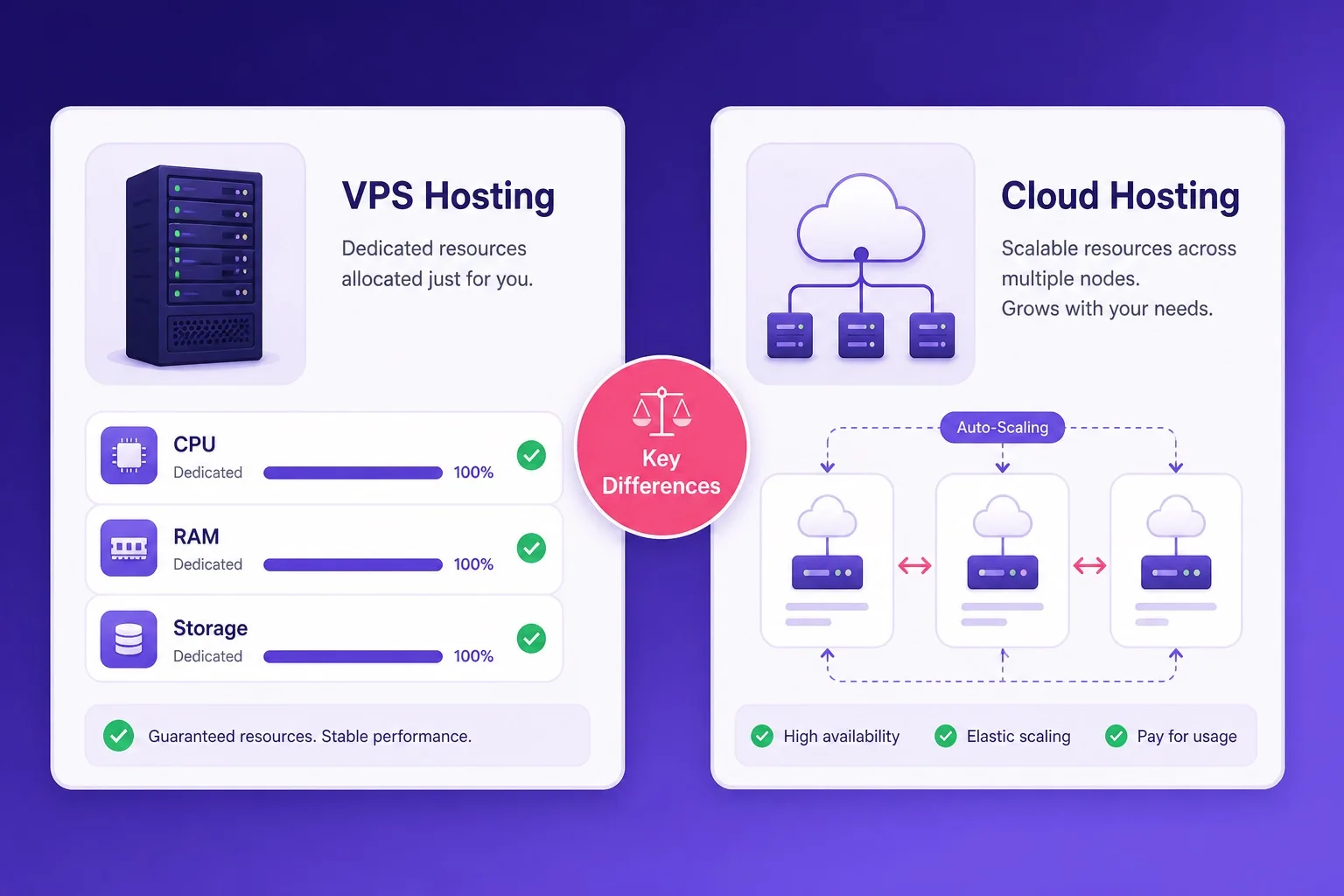
VPS gives dedicated fixed resources with root access. Cloud hosting scales automatically across multiple server nodes.
What Hostinger VPS Hosting Actually Gives You
Hostinger VPS hosting gives you a virtualized partition of a physical server with your own dedicated CPU cores, RAM allocation, and SSD storage that no other account on that machine shares with you. Root access comes standard, which means you can install any OS, configure your stack from scratch, and make server-level changes that shared or WordPress hosting plans never permit.
The resource allocation is fixed. You pay for a defined amount of CPU and RAM and that is what you get every month, regardless of what other accounts on the same physical host are doing. That consistency makes VPS a reliable environment for custom applications, database-heavy projects, and development workloads where predictable performance matters more than elastic scaling.
Hostinger VPS plans come in multiple tiers, stepping up from entry configurations with 1 vCPU and 1GB RAM all the way to plans with significantly more dedicated cores and memory. Each tier is priced on the allocated resource spec rather than the traffic pattern your site produces, which makes monthly cost predictable from day one.
The trade-off is management overhead. VPS is primarily unmanaged on Hostinger, which means you handle server software installation, security hardening, update schedules, and application configuration yourself. Hostinger provides the infrastructure and 24/7 support for hardware-level issues, but the software layer is your responsibility. That setup suits developers and technical teams but adds friction for beginners who just want a fast site running without touching a command line.
What Hostinger Cloud Hosting Actually Gives You
Hostinger Cloud hosting gives you dedicated CPU and RAM allocations similar to VPS but distributes your site across a cluster of physical servers rather than a single machine partition. If one node in the cluster has a hardware problem, your site continues running on another node automatically. That architecture is where the uptime advantage of cloud hosting over VPS comes from.
Cloud hosting on Hostinger also includes a more managed setup experience than VPS. The hPanel control panel is available, one-click WordPress install works out of the box, and the plan is designed to run WordPress and common web applications without requiring deep server-level configuration. You get dedicated resources without the full unmanaged overhead of a VPS environment.
Hostinger Cloud plans tier up from Cloud Startup through Professional to Enterprise, each increasing dedicated CPU cores, RAM, and the number of websites the account supports. Free SSL is included, and the overall experience sits closer to premium WordPress hosting than to the bare-metal environment of a VPS.
The trade-off versus VPS is that cloud hosting on Hostinger does not give you full root access or the same depth of server-level customization. If you need to run a custom application stack, configure kernel parameters, or install unusual software dependencies, VPS is the more flexible environment. Cloud hosting trades some of that control for easier management and stronger fault tolerance.
Infrastructure Difference: Single Server vs Multi-Node
The infrastructure difference between VPS and cloud hosting is the most important technical distinction to understand before buying. VPS runs on a single physical server. Your partitioned slice of that machine is isolated from other accounts, but the underlying hardware is still one box. If that box has a hardware failure, your site is down until Hostinger restores the affected server.
Cloud hosting runs across multiple physical servers connected into a cluster. Your site's data and processes are distributed so that no single hardware failure can take the entire site offline. Traffic routes to functioning nodes automatically, and Hostinger can add or adjust node resources without visible downtime on your end.
For most development projects, internal tools, staging servers, or steady-traffic sites, the single-server architecture of a well-configured VPS is reliable enough and costs less. For production sites where any downtime has real financial consequences, the multi-node resilience of cloud hosting justifies the higher price.
The uptime difference becomes most visible during hardware maintenance windows and unexpected server failures. Cloud infrastructure handles both scenarios gracefully by routing around problem nodes. VPS requires a cold reboot window or a failover migration that introduces at least some brief downtime, depending on the severity of the issue.
Performance Compared: VPS vs Cloud Hosting
Performance between VPS and cloud hosting on Hostinger is comparable under normal traffic conditions because both plan types provide dedicated CPU and RAM rather than shared pools. A well-specified VPS and a comparably resourced cloud plan will produce similar page load times for a steady-traffic WordPress site.
The performance gap opens during traffic surges. A VPS cannot allocate more RAM or CPU beyond its fixed partition without a manual plan upgrade. Cloud hosting can route additional resources from the cluster to your site automatically when traffic spikes, which prevents the slowdown a VPS might experience during a sudden load increase.
For sites with predictable, flat traffic patterns, VPS often performs as well as cloud hosting at a lower monthly cost. For sites with unpredictable or seasonal traffic such as event pages, product launches, or media-heavy blogs that occasionally go viral, cloud hosting delivers stronger sustained performance under those conditions.
Both plan types on Hostinger use SSD storage, which keeps read and write speeds consistent regardless of which infrastructure type you choose. Network connectivity and data center location matter for latency in either case, and Hostinger's server location options apply to both VPS and cloud plans depending on where you register your account.
Side by Side Comparison: VPS vs Cloud Hosting
Use this table as a direct reference before you open the Hostinger plan pages. It maps the most common decision factors across both plan types.
| Factor | Full control VPS Hosting | Cloud Hosting |
|---|---|---|
| Infrastructure | Single server partition, dedicated | Multi-node cluster, distributed |
| Root access | Full root access included | Limited, managed environment |
| Scalability | Fixed resources, manual upgrade | Auto-scales on demand |
| Uptime resilience | Single server dependency | Multi-node failover built in |
| WordPress setup | Manual config required | One-click, pre-configured |
| Entry price | Lower starting price | Higher, dedicated cloud infrastructure |
| Best for | Developers, custom apps, tech teams | Growing sites, agencies, high availability |
Confirm current features and pricing on the live Hostinger plan pages before purchase.
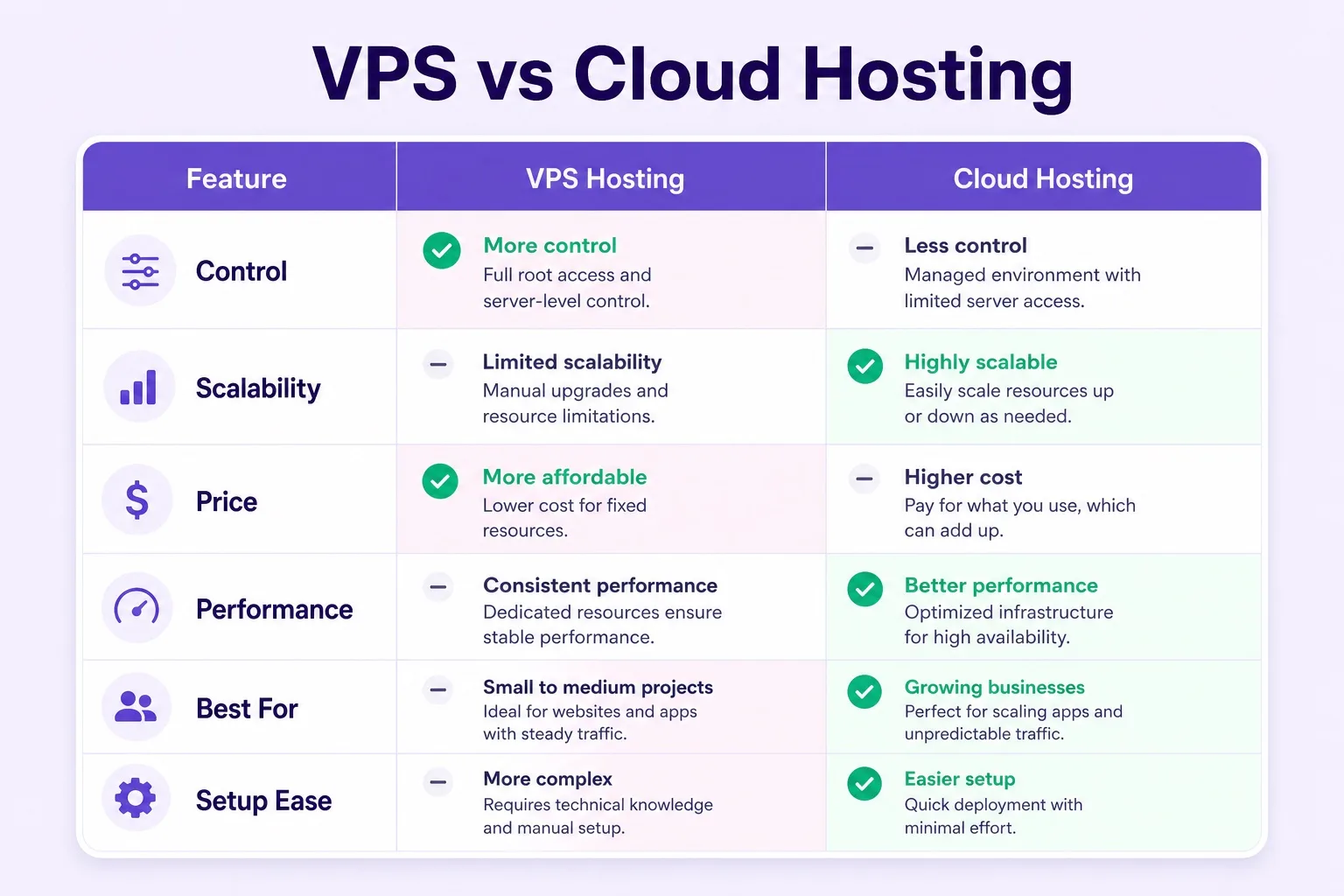
VPS wins on control and price. Cloud wins on scalability, uptime resilience, and ease of setup.
Pricing Compared: What Each Plan Type Costs
Hostinger VPS hosting typically starts at a lower monthly rate than cloud hosting when comparing equivalent resource specs. The entry VPS plan gives you 1 vCPU and 1GB RAM at a competitive introductory price, making it one of the more affordable ways to get dedicated server resources without sharing a pool with other accounts.
Cloud hosting starts higher because the multi-server infrastructure, automatic failover, and managed environment cost more to provision than a single-server partition. Hostinger Cloud Startup sits above the entry VPS price but below professional-tier VPS plans, so there is meaningful overlap in the mid-range where both plan types become comparable in price.
Always compare the effective monthly cost over the full billing term rather than just the promotional rate. Both VPS and cloud plans on Hostinger use introductory pricing that increases at renewal, and the renewal gap between the two types is worth understanding before you commit to either. Check current Hostinger VPS plan pricing and cloud plan pricing side by side on the Hostinger site before deciding which direction to go.
The total cost of ownership also includes the time investment. An unmanaged VPS plan that requires significant configuration work has a real cost in developer hours that does not appear on the Hostinger pricing page. If your team does not have the technical capacity to manage a VPS confidently, the higher base cost of cloud hosting may actually represent better value once the hidden overhead is factored in.
Control and Customization: VPS Has the Clear Edge
Control is the area where Hostinger VPS hosting has a decisive advantage over cloud hosting. Full root access on VPS means you can install any operating system from the available templates, configure every layer of the software stack, run custom daemons, set kernel parameters, and manage firewall rules at the OS level. That kind of access is not available on Hostinger Cloud plans.
This matters for a specific class of projects: custom application servers, game hosting, self-hosted tools, database servers serving multiple external applications, or any workload that requires software dependencies not available through a standard hosting control panel. These use cases belong on VPS rather than cloud hosting by design.
Cloud hosting on Hostinger offers control through hPanel rather than root-level server access. You can manage WordPress installations, databases, email accounts, DNS records, and SSL certificates through the control panel interface. That coverage handles the needs of most website owners without requiring terminal access, but it sets a hard ceiling on customization that VPS does not.
If your project will stay within the boundaries of a managed hosting environment indefinitely, the control limitation of cloud hosting is not a practical constraint. If there is any chance your workload will require custom software, server-side processes, or configurations that a control panel cannot expose, VPS is the safer long-term choice.
Scalability: Cloud Hosting Wins for Growing Sites
Scalability is the area where cloud hosting earns its higher price. When a Hostinger VPS plan hits its resource ceiling, scaling requires a manual plan upgrade. You choose a higher tier, pay the difference, and the additional CPU and RAM become available after the change processes. That cycle works fine for sites that grow steadily and predictably.
Cloud hosting on Hostinger scales differently. The underlying multi-node infrastructure can distribute load across available server capacity automatically when your site gets a sudden burst of traffic. You do not need to anticipate the surge in advance or submit a support ticket to handle it. The platform absorbs the load and your site continues responding normally.
This distinction matters most for sites that run promotional campaigns, publish content that occasionally gets shared widely, or carry seasonal traffic that spikes sharply around specific dates. A product launch, a viral blog post, or a sales event that drives ten times your normal traffic for six hours is the kind of scenario where cloud infrastructure handles the load comfortably and a fixed-resource VPS risks slowdown or timeout errors.
For steady-traffic sites without those patterns, VPS scalability is entirely workable. You upgrade when usage trends upward over weeks or months, not when a single traffic event demands it. The question is whether your traffic is predictable enough to make manual scaling a non-issue.
Who Should Buy Hostinger VPS Hosting
Hostinger VPS hosting is the right buy for developers, technical teams, and advanced users who need full server control and a dedicated resource environment at a lower price than cloud infrastructure. If your project requires root access, a custom software stack, or an environment you can configure from the OS level up, VPS is where you start.
Agencies running a single high-traffic client site on a defined resource budget often find VPS a better fit than cloud hosting because the fixed monthly cost is predictable and the resource spec can be matched precisely to the known workload. Custom application servers, database backends, game servers, and self-hosted productivity tools all run well on appropriately sized VPS plans.
Skip VPS if you are not comfortable managing a server environment without guided setup tools. The unmanaged nature of Hostinger VPS plans means a misconfigured firewall, an unpatched vulnerability, or a failed software update is your problem to diagnose and fix. WordPress bloggers and small business owners who want a fast site without touching a terminal should look at cloud hosting or WordPress hosting plans instead.
If you are currently on a WordPress hosting plan and hitting resource limits, comparing a mid-tier VPS against a Cloud Startup plan is worth doing before upgrading. For a clear look at what Hostinger WordPress hosting includes before making that jump, our Hostinger WordPress hosting review covers performance benchmarks and plan details that put the VPS comparison in context.
Who Should Buy Hostinger Cloud Hosting
Hostinger cloud hosting is the right buy for site owners who need dedicated resources, strong uptime architecture, and a managed setup experience without the maintenance overhead of an unmanaged VPS. Growing WordPress sites, ecommerce stores managing seasonal traffic, and agencies running multiple client properties under one account are the most common buyers.
The multi-node infrastructure makes cloud hosting a sensible choice for any site where downtime has a direct business cost. A revenue-generating store or a lead-generation site that loses several hours of traffic during a server outage has a measurable loss. Cloud hosting reduces that risk structurally rather than relying on fast incident response.
Cloud hosting also suits buyers who want the resource step up from shared WordPress hosting without committing to the server management demands of VPS. The hPanel experience stays familiar, WordPress setup is still a one-click process, and support covers WordPress-specific questions. You get the performance upgrade without leaving the managed hosting environment.
Avoid cloud hosting if your primary need is deep server customization or root access. You will pay cloud infrastructure prices for a managed environment that cannot give you the server-level control a VPS provides. For that use case, VPS is both cheaper and more capable. Check Hostinger cloud hosting plan tiers against your expected traffic and site count to see which dedicated resource level makes sense before committing.
VPS for WordPress: What Extra Steps Are Required
Running WordPress on Hostinger VPS is possible but requires setup steps that WordPress hosting plans handle automatically. After provisioning your VPS, you need to install a web server such as Apache or Nginx, configure PHP with the right version and extensions, set up a MySQL database, install WordPress manually or through a script, and handle SSL certificate configuration separately.
Some Hostinger VPS plans include control panels or OS templates that simplify parts of this process, but the workflow is still more hands-on than clicking through a one-click install on a WordPress hosting plan. For a developer who already manages Linux servers regularly, this setup takes under an hour. For a blogger who just wants their site online, it is a significant barrier.
Once WordPress is running on VPS, the performance advantage over shared hosting is real. You are not competing for PHP workers, database connections, or disk I/O with other accounts. A well-optimized WordPress site on a properly configured VPS can outperform the same site on a mid-tier shared WordPress hosting plan, particularly under higher traffic loads.
The management responsibility continues after launch. Plugin updates, WordPress core updates, server security patches, and backup schedules are all things you handle on VPS rather than relying on the host to automate them. If ongoing server maintenance is not something your team can absorb, cloud hosting with a managed setup is the more practical choice for WordPress specifically. For a comparison that looks specifically at the cloud hosting side of this question, our cloud hosting vs WordPress hosting guide covers the full tradeoff between the two approaches.
How to Decide: A Short Decision Path
Working through a few questions before buying makes the VPS vs cloud decision straightforward for most buyers.
- Do you need full root access and custom server configuration? If yes, VPS is your answer.
- Is your traffic predictable and steady, or unpredictable with occasional surges? Unpredictable traffic favors cloud hosting.
- Do you have in-house technical capacity to manage an unmanaged server? If no, cloud hosting is the more practical choice.
- Is uptime during hardware failure a hard business requirement? If yes, cloud hosting's multi-node architecture is worth the premium.
- Is budget the primary constraint and your traffic is steady? VPS gives more resource per dollar on entry plans.
- Are you running WordPress only with no custom stack needs? Cloud hosting or WordPress hosting is a cleaner fit than VPS.
Most buyers end up in one of two clear groups after those questions: developers and technical teams on VPS, website owners and growing businesses on cloud hosting. The overlap zone is smaller than the marketing language on either plan page makes it seem.
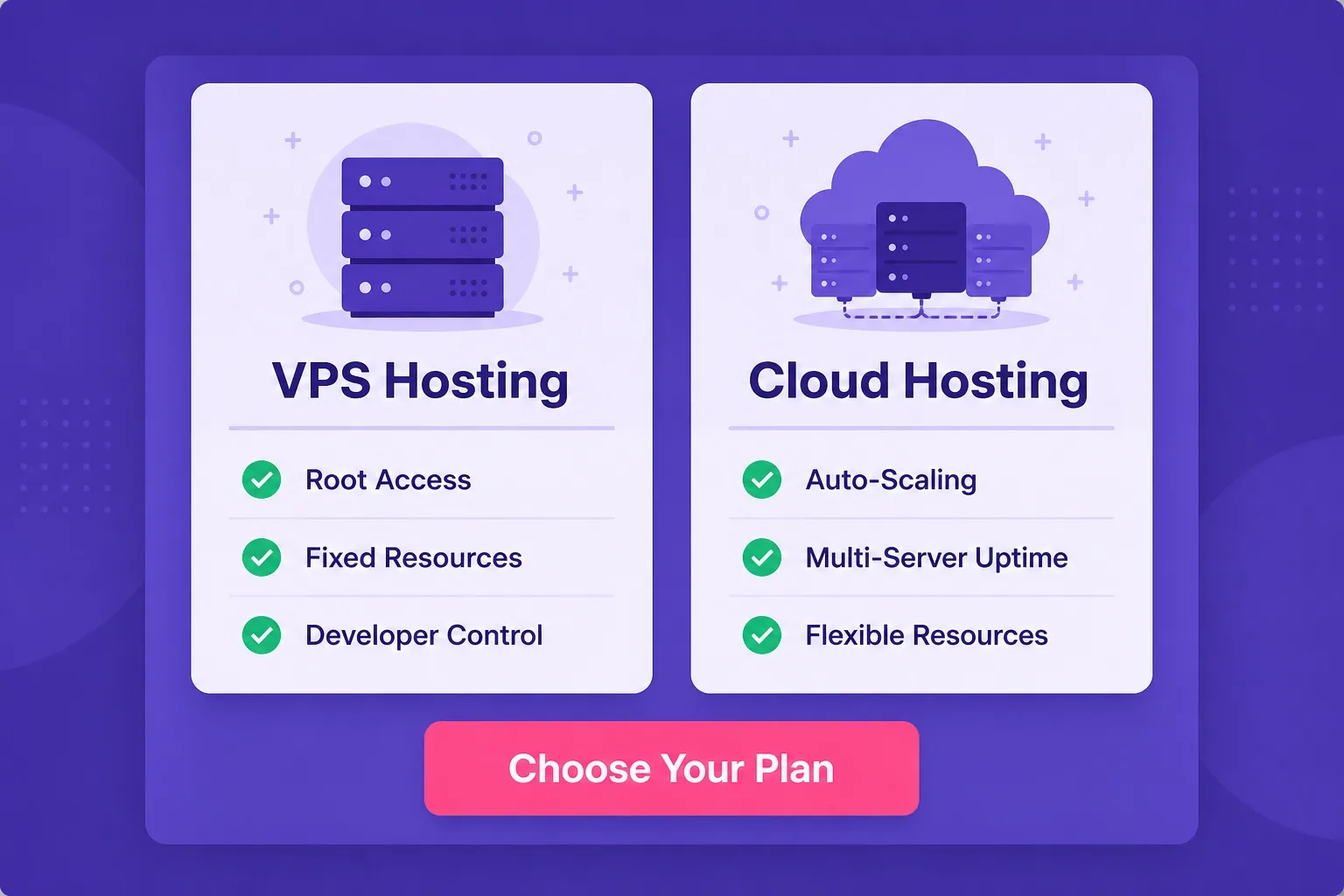
Choose VPS for root access and fixed resources. Choose cloud hosting for managed setup, scaling, and uptime resilience.
Mistakes to Avoid When Choosing Between VPS and Cloud
Buying VPS for a WordPress blog because it sounds more powerful than shared hosting is a common and expensive mistake. VPS gives you power and flexibility you will not use if your entire workflow is publishing WordPress content through the dashboard. The management overhead is real, and WordPress hosting plans already outperform shared hosting for WordPress workloads without the server admin burden.
Choosing cloud hosting primarily because the word cloud sounds more modern or robust than VPS misses the actual decision factor. If your project genuinely needs root access and custom configuration, cloud hosting on Hostinger cannot give you that regardless of the name or price. Pay for the plan that matches the technical requirement, not the one that sounds better.
Ignoring renewal pricing on either plan type is a recurring budgeting error. Both VPS and cloud plans carry promotional introductory rates that step up at renewal. Writing down the renewal figure on the day you buy prevents a surprise twelve months later when the bill doubles.
Skipping resource monitoring after launch is another common mistake, particularly on VPS. If your site gradually grows toward the ceiling of the allocated resources, performance degrades slowly rather than failing suddenly. Checking CPU and RAM usage in hPanel or through server monitoring tools monthly keeps you ahead of that curve rather than reacting to it after visitors notice the slowdown.
Hostinger VPS Hosting vs Cloud Hosting FAQ
These are the questions buyers ask most often before choosing between Hostinger VPS and cloud hosting. Read through the ones most relevant to your project before finalizing a plan.
What is the main difference between Hostinger VPS and cloud hosting?
Hostinger VPS gives you a fixed slice of a physical server with dedicated CPU, RAM, and root access. Hostinger Cloud hosting distributes your site across multiple servers and scales resources automatically. VPS is better for control and stable workloads; cloud is better for scalability and high availability.
Is Hostinger VPS hosting cheaper than cloud hosting?
Generally yes. Hostinger VPS plans start at a lower monthly rate than cloud hosting plans because VPS gives fixed dedicated resources on a single server partition rather than distributed cloud infrastructure. Always confirm current pricing at checkout.
Can I run WordPress on Hostinger VPS hosting?
Yes. WordPress runs on Hostinger VPS but requires more manual setup compared to Hostinger WordPress hosting plans. You configure your stack, install WordPress, and manage the server environment yourself or with the available OS templates.
Which is better for high traffic websites, VPS or cloud hosting?
Cloud hosting handles unpredictable traffic spikes better because it scales resources automatically across multiple nodes. VPS handles steady high-traffic workloads well if the allocated resources are sufficient, but cannot auto-scale beyond the fixed partition size without a manual upgrade.
Does Hostinger VPS include managed support?
Hostinger VPS is primarily unmanaged, meaning you are responsible for server configuration, security hardening, and software updates. Hostinger provides 24/7 support for infrastructure issues but the application layer is your responsibility.
Do both Hostinger VPS and cloud hosting include free SSL?
Free SSL availability depends on plan configuration. On Hostinger, SSL setup on VPS requires manual configuration via your control panel or command line. Cloud hosting plans typically include SSL as part of the managed hosting environment. Confirm SSL inclusion on the plan page before purchase.
Who should choose Hostinger VPS over cloud hosting?
Developers, agencies, and technical users who need full root access, custom server configuration, or a reliable fixed-resource environment for applications, databases, or custom stacks should choose VPS. Cloud hosting suits buyers who prioritize automatic scaling and high availability over deep server control.
Can I upgrade from VPS to cloud hosting on Hostinger?
Yes. Hostinger allows plan changes. If you start on a VPS plan and find your site needs the automatic scaling and uptime architecture of cloud hosting, you can migrate your setup to a cloud plan. Contact Hostinger support for migration guidance specific to your configuration.
What is the uptime difference between VPS and cloud hosting?
Cloud hosting has a structural uptime advantage because your site runs across multiple server nodes. If one node fails, traffic routes to another automatically. VPS sits on a single server partition, so a hardware issue on that server affects your site directly until Hostinger resolves it.
Final Verdict: VPS or Cloud Hosting on Hostinger
Hostinger VPS hosting vs cloud hosting is ultimately a decision between control and convenience. VPS gives you more control, a lower starting price, and a stable dedicated resource environment suitable for technical projects that need root access or a custom stack. Cloud hosting gives you a managed environment, automatic scaling, and multi-node uptime resilience suitable for growing sites that need reliability without server admin overhead.
Start with VPS if you are a developer or technical user who knows how to configure a server and has a specific reason to need root-level access. Start with cloud hosting if you are running a production WordPress site, an ecommerce store, or a multi-site agency setup where uptime and ease of management outweigh the flexibility benefit of VPS.
If you are still on shared WordPress hosting and evaluating which step up to take, both plans represent a genuine performance upgrade. The right move depends on your team's technical capacity and whether your traffic patterns demand elastic scaling or simply need more consistent dedicated resources. For more context on where these plans sit relative to WordPress-specific hosting options, our wordpress hosting blog covers comparison guides across every Hostinger plan type.
When you are ready to buy, you can review current tiers and confirm Hostinger VPS hosting plan pricing directly, or check Hostinger cloud hosting plans on the same session to compare dedicated resource levels and promotional rates side by side before committing to either option.
For a broader starting point that covers all Hostinger hosting options in one place, the best WordPress hosting homepage includes plan overviews and buying guidance you can reference before finalizing this decision.
If you are evaluating managed cloud hosting beyond Hostinger's own cloud plans, Cloudways offers a managed hosting layer on top of DigitalOcean, AWS, Google Cloud, Vultr, and Linode so you get real cloud infrastructure with a managed dashboard rather than raw server access. It is a strong option for agencies and growing WordPress sites that want cloud performance without unmanaged VPS overhead.