Can Hostinger VPS Handle High Traffic WordPress? The Short Answer
Can Hostinger VPS handle a high traffic WordPress website? Yes, it can, but the answer is not automatic. The right VPS plan tier paired with proper server configuration, a page caching layer, and a CDN makes the difference between a site that holds up under load and one that throws timeout errors the moment traffic increases.
Hostinger VPS gives you dedicated vCPU cores, RAM, and NVMe SSD storage that are not shared with other accounts. That resource isolation is exactly what high-traffic WordPress sites need to stay fast when dozens or hundreds of visitors land simultaneously. The key is matching your plan tier to your actual traffic volume and setting up the server stack correctly before sending real visitors to it.
This article covers which Hostinger VPS plans handle high traffic WordPress well, what you need to configure on the server to get the most out of those resources, and a clear recommendation for which plan tier to buy based on your current and projected traffic levels. If you want to compare current plan specs while you read, open Hostinger VPS hosting plans in a second tab alongside this guide.
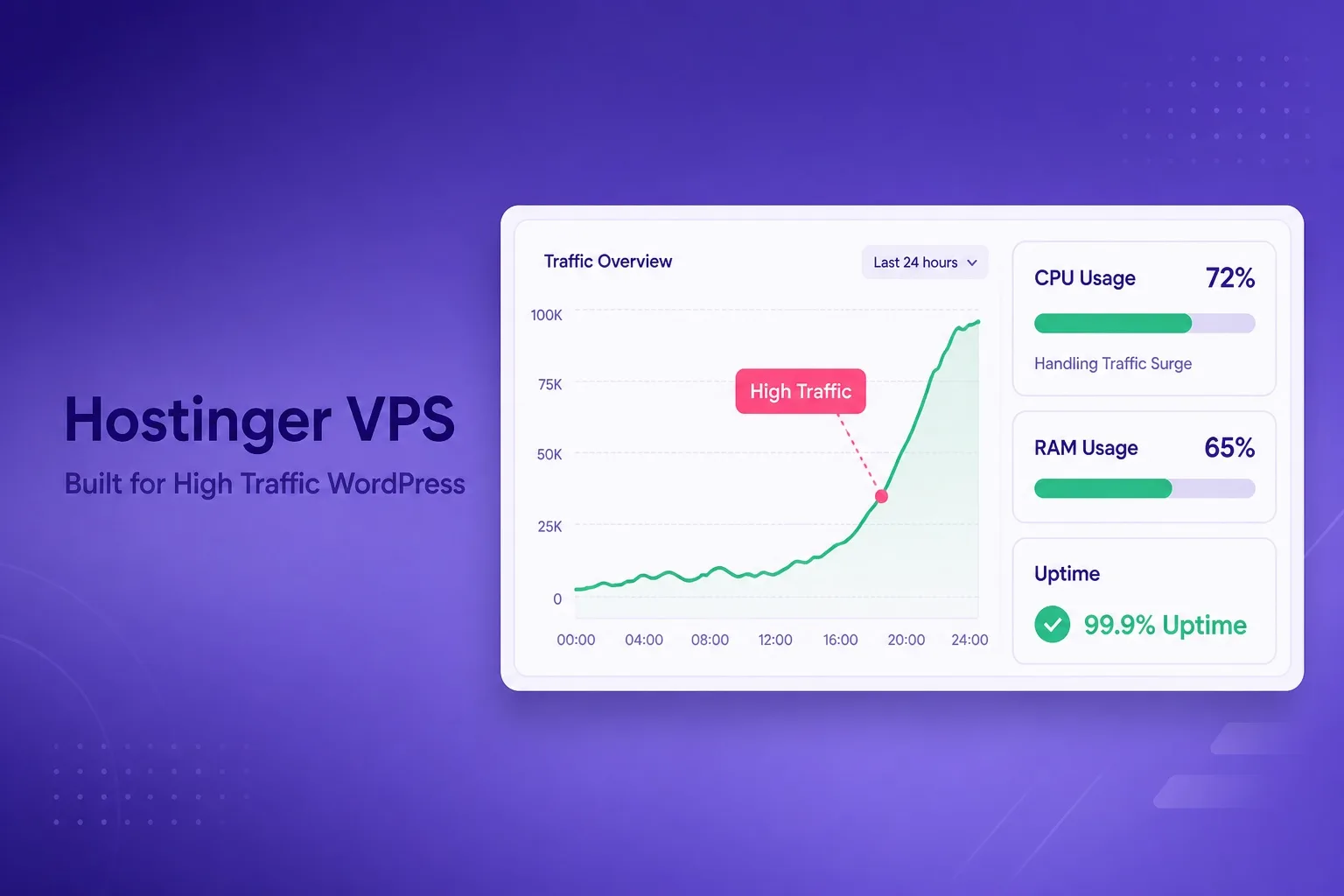
Dedicated vCPU, NVMe SSD, and isolated RAM on every Hostinger VPS plan. Proper caching configuration turns those resources into consistent high-traffic performance.
Why Shared Hosting Fails Under High Traffic
Shared WordPress hosting allocates resources from a pooled server environment where multiple accounts share the same CPU, RAM, and disk I/O capacity. Under normal low traffic this arrangement works fine and the shared cost keeps prices accessible. Under high traffic, every other account on the same server competes for the same resources at the same time as your site.
The result is predictable: response times climb, database queries queue up, and PHP workers run out. Shared hosting providers typically enforce per-account resource limits that throttle your site before it can consume the full server capacity, which means your traffic surge gets capped exactly when you need the server to absorb it most.
VPS removes that shared environment entirely. Your vCPU allocation, RAM, and NVMe storage belong to your account exclusively and no other tenant on the physical host can eat into them. That isolation is the structural reason VPS handles high-traffic WordPress better than shared hosting, and it is why the upgrade to VPS is the standard recommendation when a WordPress site consistently outgrows its shared plan.
The transition point is usually visible in your analytics before it becomes a performance crisis. If your site is regularly receiving more than a few hundred concurrent visitors and your shared hosting load times are creeping upward or your host is sending resource limit warnings, VPS is the correct next step. Starting on the right VPS tier before traffic causes problems saves you from a rushed mid-crisis upgrade later.
What Makes Hostinger VPS Good for High Traffic WordPress
Hostinger VPS uses KVM virtualization which gives each plan a fully isolated and dedicated resource environment. KVM-based VPS plans behave like dedicated servers for resource allocation purposes, which means your WordPress site gets the full benefit of the vCPU cores and RAM you pay for without contention from neighboring accounts on the same physical host.
NVMe SSD storage across all Hostinger VPS tiers is a meaningful advantage for WordPress specifically. WordPress sites under high traffic generate frequent database read operations, theme file requests, and plugin asset loads. NVMe delivers those reads significantly faster than SATA SSD-based storage, which reduces the disk I/O bottleneck that limits performance on older server storage types.
Full root access is what makes the server actually performant for WordPress at scale. Without root access you cannot tune PHP-FPM worker pools, configure Nginx microcaching, install Redis for object caching, or set up a robust firewall to protect the server from bad traffic that wastes resources. Root access is included by default on every Hostinger KVM plan, which gives you control over every performance lever that matters.
Hostinger's global data center network lets you place the server close to your primary audience. A data center in Europe for a European-majority audience, or one in the US for North American readers, shaves latency off every single page request before you apply any other optimization. That geographic proximity is a baseline performance factor that shared hosting rarely gives you direct control over.
Which Hostinger VPS Plan Handles High Traffic WordPress
Matching the right KVM plan to your traffic level is the most practical decision in this article. The wrong choice in either direction costs money: too small a plan means performance degradation under load, too large a plan means paying for resources you are not using.
KVM 1 (1 vCPU, entry RAM) suits sites transitioning from shared hosting with growing but not yet heavy traffic. A well-optimized WordPress installation with full-page caching on KVM 1 handles several hundred concurrent visitors comfortably. If your site is consistently receiving more than that or you run a WooCommerce store with dynamic uncached requests, KVM 1 will show strain under load.
KVM 2 (2 vCPU, 4GB RAM) is the practical starting point for most high-traffic content sites. With Nginx, PHP-FPM, Redis, and a CDN in front of the server, KVM 2 handles several thousand unique visitors per hour for a content-heavy WordPress site without breaking a sweat. This is the tier most buyers upgrading from shared hosting land on when their traffic has clearly outgrown the shared environment.
KVM 4 (4 vCPU, 8GB RAM or higher) covers sites with consistently heavy concurrent traffic, large media libraries with frequent large-file requests, multiple WordPress installations on one server, or WooCommerce stores running non-trivial checkout volumes. If your analytics show five thousand or more concurrent sessions regularly, KVM 4 is where the headroom starts to feel comfortable rather than just adequate.
Higher KVM tiers are available for agencies, SaaS applications on WordPress infrastructure, or any workload that pushes beyond what KVM 4 comfortably handles. Confirm current plan specs and promotional pricing on the live Hostinger VPS plan page before choosing a tier, since resource allocations and introductory rates are updated periodically.
VPS Plan Comparison for High Traffic WordPress Sites
Use this table to match your current or expected traffic level to a Hostinger KVM plan tier before you open the checkout page.
| Factor | KVM 1 | Most popular KVM 2 | KVM 4+ |
|---|---|---|---|
| vCPU | 1 core | 2 cores | 4+ cores |
| RAM | Entry | 4 GB | 8 GB+ |
| NVMe storage | 50 GB | 100 GB | 200 GB+ |
| Traffic fit | Low to moderate growth | High traffic content sites | Very high traffic or multi-site |
| WooCommerce | Light stores only | Moderate store volume | Heavy store traffic |
| Best for | Transitioning from shared | Growing blogs, media sites | Agencies, large sites |
Visitor capacity estimates assume full-page caching and CDN in place. Uncached dynamic WordPress requests consume significantly more CPU per request.
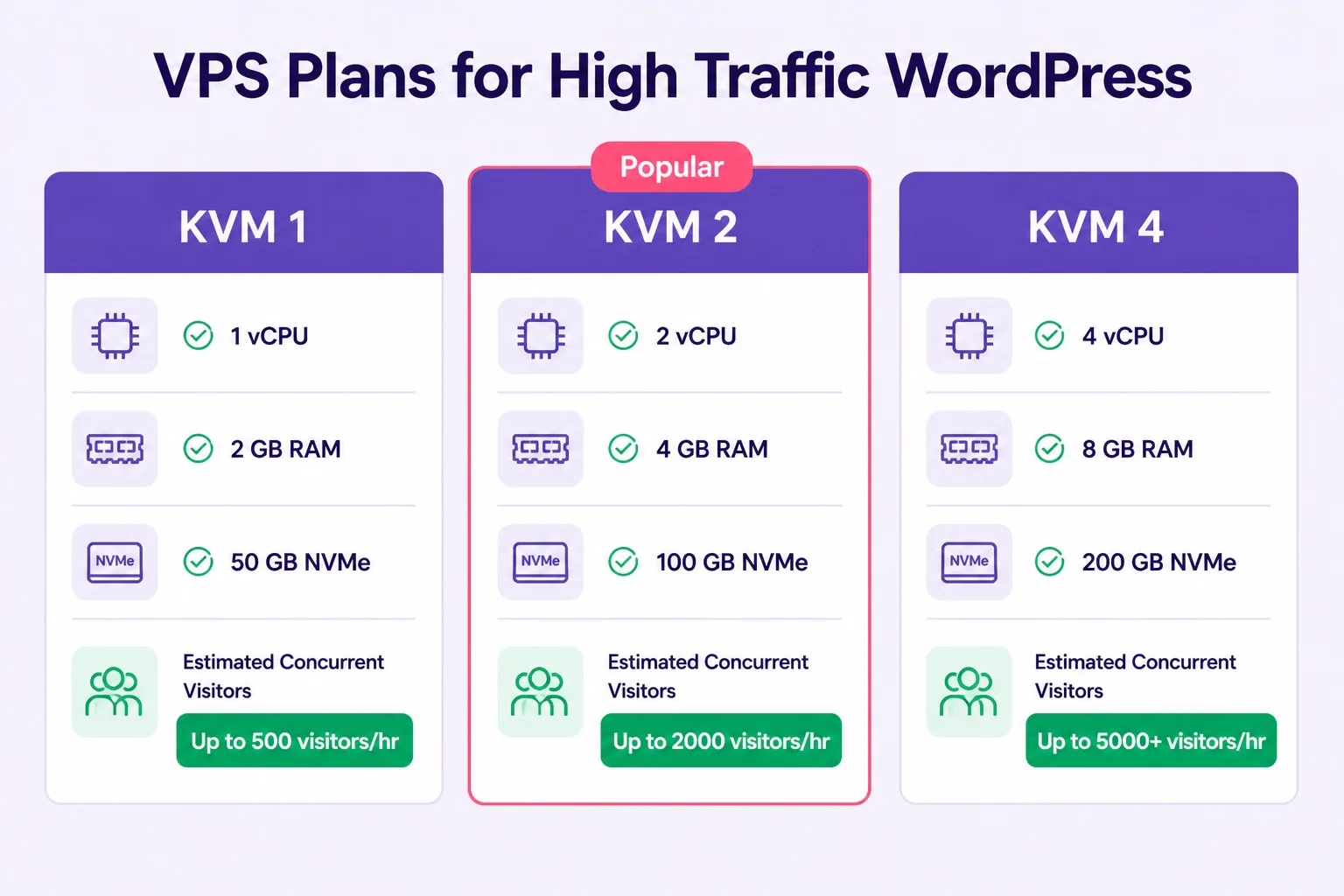
KVM 2 is the recommended starting point for most high-traffic WordPress sites. Move to KVM 4 when concurrent traffic consistently exceeds that tier's comfortable range.
How to Configure WordPress on VPS for Maximum Traffic Capacity
Raw VPS resources alone do not make a WordPress site fast under load. How the server stack is configured determines whether a KVM 2 plan serves two thousand visitors per hour or five hundred before slowing down. The difference between those two numbers comes entirely from setup decisions made before traffic arrives.
Install Nginx as your web server rather than Apache for high-traffic WordPress. Nginx handles concurrent connections with a significantly lower memory footprint than Apache's process-based model, which means more of your RAM stays available for PHP and MySQL rather than being consumed by idle web server workers waiting for requests.
Configure PHP-FPM with a dynamic process manager and set the max children count based on your available RAM. A rough starting point is to allow one PHP-FPM worker per 20-30MB of available memory after accounting for Nginx and MySQL baseline usage. Too many workers and you exhaust RAM; too few and concurrent requests queue rather than process.
Enable full-page caching with Nginx FastCGI cache or a WordPress plugin like WP Rocket or W3 Total Cache configured to write static HTML to disk. A cached page request bypasses PHP and MySQL entirely, serving a pre-built HTML file from disk instead. On NVMe storage that read is extremely fast, which is why full-page caching on VPS scales so dramatically versus shared hosting where disk I/O is shared.
Install Redis and configure WordPress object caching through the Redis Object Cache plugin. This keeps frequently queried database results in memory rather than running repeated MySQL queries for the same data. On a content site where the same posts and taxonomy queries run for many visitors, Redis object caching reduces database load by a significant margin.
Setting Up a CDN in Front of Hostinger VPS
A CDN in front of your Hostinger VPS is not optional for a genuinely high-traffic WordPress site. Without a CDN, every static asset request including images, CSS, JavaScript, and fonts hits your VPS directly. Multiply that by several thousand concurrent visitors and the bandwidth and server load add up quickly even with excellent caching in place.
Cloudflare's free plan is the most widely used option and works well as a first-line CDN and DDoS protection layer for VPS-hosted WordPress sites. Once your domain is proxied through Cloudflare, static assets are served from Cloudflare's global edge network rather than your VPS server. Your VPS only receives requests that Cloudflare cannot serve from its cache, which means dynamic WordPress pages and logged-in user requests.
Configure Cloudflare's caching rules to cache static pages for anonymous visitors at the edge, which further reduces the number of requests that actually reach your VPS. The combination of Cloudflare edge caching and Nginx FastCGI full-page caching on the VPS itself is the most resource-efficient setup available for high-traffic WordPress without moving to dedicated servers.
Set your Cloudflare SSL mode to Full Strict and install a valid certificate on your VPS using Certbot for Let's Encrypt. This ensures end-to-end encryption between visitor, Cloudflare edge, and your origin VPS server, which matters both for security and for avoiding mixed content warnings that can slow browser rendering.
WordPress Speed Checklist for Hostinger VPS
Run through this checklist before sending high-traffic campaigns to your VPS-hosted WordPress site. Every skipped item is a resource leak that reduces your effective traffic ceiling.
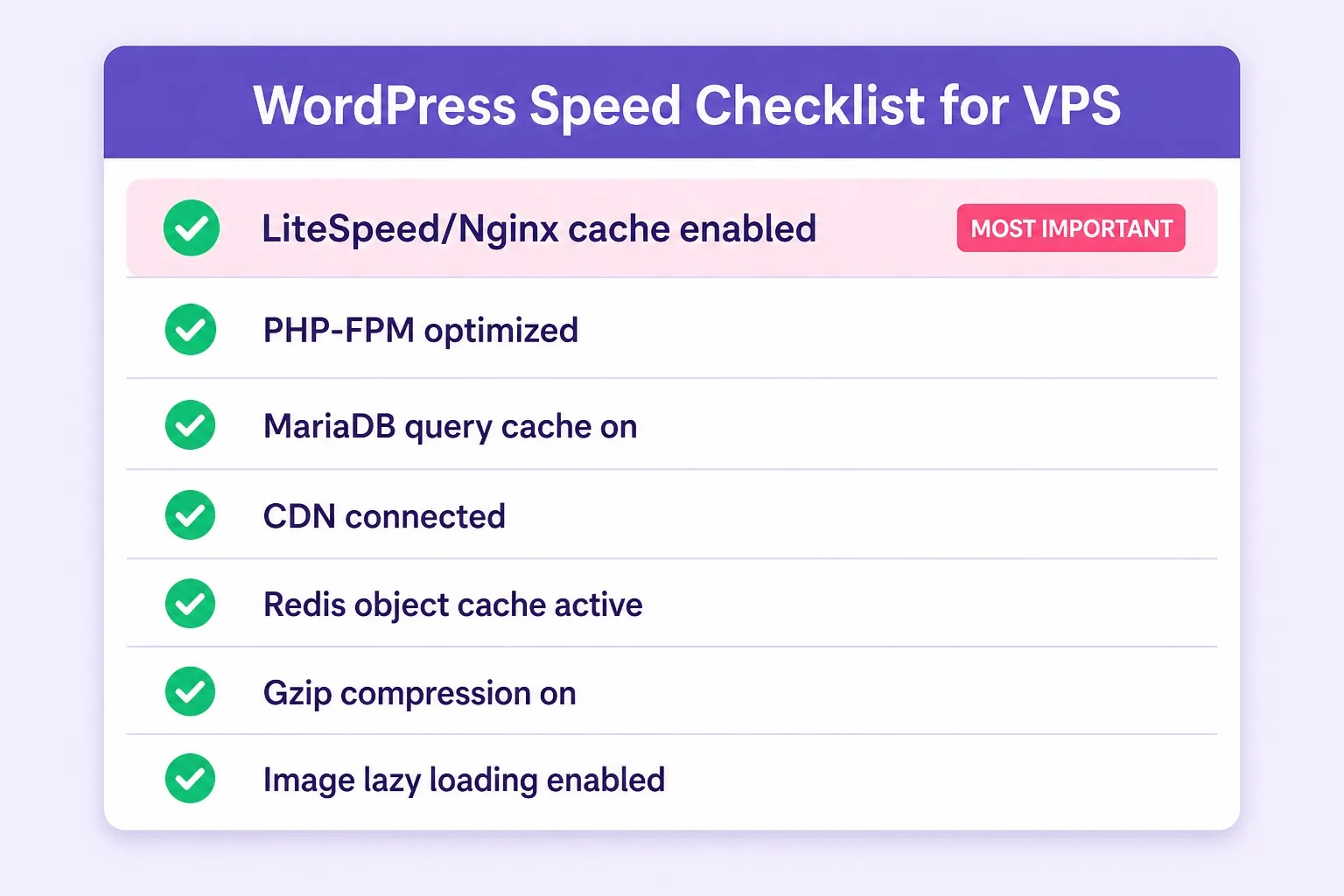
Each item on this checklist increases your effective traffic ceiling. Skipping even one layer, especially full-page caching, significantly reduces how many visitors your plan can serve without slowdown.
- Full-page caching on: Nginx FastCGI cache or a plugin writing static HTML. This single step has the biggest impact on traffic capacity.
- PHP-FPM tuned: Set max children based on available RAM, not the default value from the template.
- MariaDB or MySQL query cache: Enable the query cache and set a sensible buffer pool size for your RAM allocation.
- Redis object caching: Install Redis and connect it to WordPress via the Redis Object Cache plugin.
- CDN connected: Proxy the domain through Cloudflare or equivalent. Configure static asset caching at the edge.
- Gzip or Brotli compression: Enable compression in Nginx to reduce response payload sizes for text-based assets.
- Image lazy loading: Ensure WordPress native lazy loading is active. Use properly sized and compressed WebP images throughout the site.
- Unnecessary plugins disabled: Every active plugin that runs PHP on every request adds to page generation time. Audit and remove plugins you do not actively use.
- Database query optimization: Install a query monitoring tool and identify any slow queries in your theme or plugins. A single poorly indexed query can become a bottleneck at scale.
- Load test before going live: Use a tool like k6 or Loader.io to simulate concurrent users against your server before a launch or campaign. Review the CPU and RAM usage in the VPS management panel during the test.
What Happens at the Resource Ceiling on VPS
Understanding what happens when a VPS plan hits its resource ceiling helps you plan rather than react. When CPU usage sustains at 100% for more than a few seconds, new PHP-FPM workers queue instead of spawning. Visitors experience slower response times as requests wait in line rather than processing immediately.
When RAM fills completely, the Linux kernel begins swapping memory to disk. Even on NVMe storage, disk swap is orders of magnitude slower than RAM. A server swapping under load will produce dramatically higher response times, and in extreme cases the out-of-memory killer will start terminating processes to reclaim memory, which can take down MySQL or PHP-FPM entirely.
Monitoring your VPS resource usage in the Hostinger management panel gives you early warning before either ceiling becomes a problem. If you see CPU regularly sustaining above 70% or RAM consistently above 80% during normal traffic, that is the signal to either optimize the server stack further or upgrade to the next KVM tier before traffic increases further.
The practical rule is to upgrade before you need to, not after performance degrades. Traffic growth is usually visible in Google Analytics weeks before it becomes a server issue, which gives you time to compare KVM plan upgrades and adjust your Hostinger VPS plan in a planned window rather than under emergency pressure.
VPS vs Cloud Hosting for High Traffic WordPress
VPS and cloud hosting both handle high-traffic WordPress well, but the difference in how they handle traffic spikes matters for the buying decision. A Hostinger VPS serves your traffic from a fixed resource allocation. When traffic exceeds that allocation, performance degrades until the surge passes or you upgrade the plan. Cloud hosting routes additional server capacity from the cluster automatically when traffic spikes, without a manual upgrade step from you.
If your traffic is predictable and grows steadily rather than spiking suddenly, VPS is the more cost-effective choice because you pay for a defined resource tier rather than elastic cloud infrastructure pricing. A media blog with steady organic traffic growth, a consistently visited business directory, or a regularly scheduled email-driven content site all fit the VPS traffic profile well.
If your site receives traffic spikes driven by campaigns, social sharing, or seasonal events where visitor volume can increase tenfold within an hour, cloud hosting handles that scaling event structurally in a way VPS cannot match without pre-scaling. For a direct comparison of how the two plan types handle this scenario, our Hostinger VPS vs cloud hosting guide covers every key difference.
The practical approach for most buyers is to start on VPS and scale up plan tiers as traffic data confirms the need, then evaluate cloud hosting when the traffic pattern becomes genuinely unpredictable or when the highest VPS tier no longer provides comfortable headroom.
Who Should Buy Hostinger VPS for High Traffic WordPress
High-traffic WordPress blogs, news sites, and content publishers with steady organic traffic growth are the clearest fit for Hostinger VPS. Once shared hosting produces resource limit warnings or load times start climbing under normal traffic, a KVM 2 or KVM 4 plan with proper caching gives those sites the dedicated resource headroom they need at a lower price than cloud hosting.
WooCommerce store owners who have outgrown shared hosting and need a server environment they can tune for checkout performance, database efficiency, and session handling belong on VPS rather than shared plans. The ability to configure PHP session storage, tune the database buffer pool, and set up Redis for WooCommerce session caching makes a real difference for stores running meaningful order volumes.
Developers who manage several WordPress sites for clients and want to consolidate them onto a single managed server will find VPS cost-effective at the KVM 4 tier or above. Running four or more client sites on a single well-configured VPS typically costs less per site than paying for separate shared hosting plans, while delivering better performance across the board.
Buyers who are not ready to manage a Linux server themselves should consider Hostinger's WordPress hosting plans before VPS. The managed environment handles PHP configuration, caching basics, and WordPress setup automatically, which is a better starting point for non-technical buyers even if the raw resource ceiling is lower. For a detailed comparison of what those plans include, our Hostinger WordPress hosting review covers setup, performance, and plan differences in full.
Mistakes to Avoid When Setting Up VPS for High Traffic WordPress
Skipping full-page caching is the most costly mistake for a high-traffic VPS setup. Without full-page caching, every visitor request triggers a PHP execution and a database query. That dynamic request model burns through CPU and RAM at a rate that no reasonable VPS plan can absorb for thousands of concurrent users. Enable full-page caching before any other optimization step.
Over-provisioning PHP-FPM workers eats RAM faster than traffic itself. A common mistake on freshly provisioned VPS plans is leaving PHP-FPM at a default configuration that either spawns too many workers and exhausts RAM, or sets a static count too low and creates a queue bottleneck under concurrent load. Tune the process manager to dynamic mode and set limits based on your actual available memory.
Ignoring database optimization leads to slow query accumulation that only surfaces under load. A WordPress site with a few hundred posts and a typical plugin set may have slow queries that are invisible under light traffic but become a bottleneck when hundreds of visitors trigger the same queries simultaneously. Run EXPLAIN on your most common queries and add appropriate indexes before launching a high-traffic campaign.
Not setting up monitoring means you have no early warning before a resource ceiling becomes a visitor-facing problem. Install a lightweight monitoring tool or use the Hostinger VPS management panel alerts to track CPU and RAM trends. A ten-minute check once a week during growth periods is enough to catch a resource trend before it becomes a crisis.
Hostinger VPS High Traffic WordPress FAQ
These are the questions site owners ask most often before buying Hostinger VPS for a high-traffic WordPress site. Read through the ones that apply to your situation before finalizing your plan choice.
Can Hostinger VPS handle a high traffic WordPress website?
Yes. Hostinger VPS handles high traffic WordPress sites effectively when the right plan tier is matched to your traffic volume and the server is properly configured with page caching, PHP-FPM tuning, and a CDN. A well-optimized KVM 2 or higher plan can serve thousands of concurrent visitors without slowdown.
Which Hostinger VPS plan is best for a high traffic WordPress site?
KVM 2 (2 vCPU, 4GB RAM) is the practical starting point for most high-traffic WordPress sites. KVM 4 suits sites with consistently heavy concurrent traffic or multiple WordPress installations under one server. KVM 1 is best for sites transitioning from shared hosting with moderate traffic growth.
How many visitors can Hostinger VPS handle?
Visitor capacity depends on plan tier and how well the server stack is optimized. A KVM 2 plan with full-page caching, PHP-FPM, and a CDN can comfortably handle several thousand unique visitors per hour for a content-focused WordPress site. Uncached dynamic requests consume far more resources and reduce that ceiling significantly.
What caching setup works best for WordPress on Hostinger VPS?
Nginx with FastCGI full-page caching is the most resource-efficient setup for high-traffic WordPress on VPS. Redis object caching reduces database load significantly for sites with logged-in users or dynamic content. A CDN such as Cloudflare in front of the VPS offloads static asset delivery and reduces direct server requests.
Is Hostinger VPS better than shared WordPress hosting for high traffic?
Yes. Shared WordPress hosting allocates pooled server resources. Under high traffic those shared resources become a bottleneck. VPS gives you dedicated vCPU and RAM not shared with other accounts, which produces consistent performance under load that shared hosting cannot match.
Does Hostinger VPS include a CDN for WordPress?
Hostinger VPS does not include a CDN by default. You configure CDN integration separately, typically through Cloudflare's free plan. Cloudflare proxies traffic through its global network before it reaches your VPS, reducing server load and improving page load times for visitors in different regions.
What happens when a Hostinger VPS hits its resource limit?
When a VPS plan reaches its CPU or RAM ceiling under heavy traffic, response times slow and the server may return timeout errors for new requests. Unlike cloud hosting, VPS cannot auto-scale beyond the allocated resources. The solution is to upgrade to a higher KVM tier or optimize caching to reduce dynamic request load before hitting the ceiling.
Should I use Hostinger VPS or cloud hosting for a high traffic WordPress site?
VPS handles high traffic well when that traffic is predictable and steady. Cloud hosting is the better choice when traffic spikes are unpredictable, such as product launches or viral content events, because cloud infrastructure scales automatically while VPS has a fixed resource ceiling.
Do I need root access to optimize WordPress on Hostinger VPS?
Yes. Most performance optimizations for high-traffic WordPress on VPS, such as PHP-FPM pool tuning, Nginx worker configuration, Redis setup, and server-level caching, require root SSH access. This is included by default on all Hostinger VPS plans.
Final Verdict: Can Hostinger VPS Handle High Traffic WordPress?
Can Hostinger VPS handle a high traffic WordPress website? Yes, and it does so well when you pair the right plan tier with a properly configured server stack. The dedicated vCPU, isolated RAM, and NVMe SSD storage give Hostinger VPS the structural resource foundation that high-traffic WordPress needs. The full-page caching layer, PHP-FPM tuning, Redis object cache, and Cloudflare CDN in front of the server turn those resources into the actual traffic capacity your visitors experience.
KVM 2 is the recommended plan for most buyers moving to VPS for high-traffic WordPress. It provides enough CPU and RAM headroom for a well-optimized content site to handle thousands of visitors per hour at a price that stays below cloud hosting. KVM 4 covers agencies, heavy stores, and multi-site setups where KVM 2 resources would consistently run close to their ceiling.
The honest caveat is that the configuration work is on you. Hostinger VPS is an unmanaged product and the performance ceiling you achieve is directly related to how well you set the server up. A default Linux installation with no caching configuration will underperform on a KVM 4 plan. A carefully tuned Nginx and PHP-FPM stack with Redis and Cloudflare will outperform shared hosting dramatically on KVM 1.
For buyers comparing the full range of Hostinger options before deciding where to host a growing WordPress site, our wordpress hosting blog covers managed WordPress plans, cloud hosting, and VPS comparisons in one place so you can make the decision with full context.
When you are ready to move forward, you can compare current tiers and buy Hostinger VPS hosting directly while promotional pricing is active. Confirm plan specs, vCPU and RAM allocation, data center location, and renewal pricing on the order summary before you pay.
For a wider overview of Hostinger's hosting options including plans suited to buyers not yet ready for unmanaged VPS, the best WordPress hosting homepage covers every plan type with practical buying guidance.
If you prefer a fully managed cloud environment for high-traffic WordPress without the configuration overhead of an unmanaged VPS, Cloudways managed cloud hosting runs on major cloud providers with built-in Redis Object Cache Pro, staging, and one-click scaling. The Autonomous plan is specifically built to auto-scale for high-traffic WordPress and WooCommerce sites.