Hostinger Business Plan Review for WordPress looks at what actually changes when you move up from Premium, not just the price shown on the plan page.
Business sits above Premium and below the VPS tiers, built for sites that already see real traffic or run a store. The main question most buyers ask is simple: is that extra headroom worth the higher renewal.
What the Hostinger Business Plan Actually Gives You for WordPress
The Hostinger Business plan bundles more CPU and RAM, a higher monthly visit allowance, daily backups, and staging tools on top of everything Premium already covers for WordPress hosting.
For a beginner, that mostly means one thing: your site keeps its speed even as traffic, plugins, and page count grow, instead of slowing down the way a thinner plan sometimes does.
Multiple website hosting is included too, so a small agency or a store owner running a second brochure site does not need a separate account for each install.
You can compare the exact limits on a live Hostinger Business plan page before deciding whether the jump from Premium fits your current site.
None of this makes Business the automatic right pick. It simply gives more room, and that room only pays for itself when your site is close to using it.
Inside hPanel, the resource meters for CPU, RAM, and storage sit on the same dashboard for both tiers. Watching those meters for a week tells you more than any spec sheet does.

Business adds resource headroom on top of Premium. The renewal line decides if that headroom is worth paying for.
Hostinger Business Plan Speed and Resources for WordPress Sites
Hostinger Business plan speed and resources for WordPress sites is the strongest reason most buyers actually pay the higher renewal, more than any single feature checkbox.
The plan runs on the same LiteSpeed setup as Premium, but with more CPU cores and RAM assigned to your account, which shows up during traffic spikes rather than on a quiet afternoon.
NVMe storage keeps database queries and page loads fast on both tiers, so the speed gap between Premium and Business is really about consistency under load, not raw top speed.
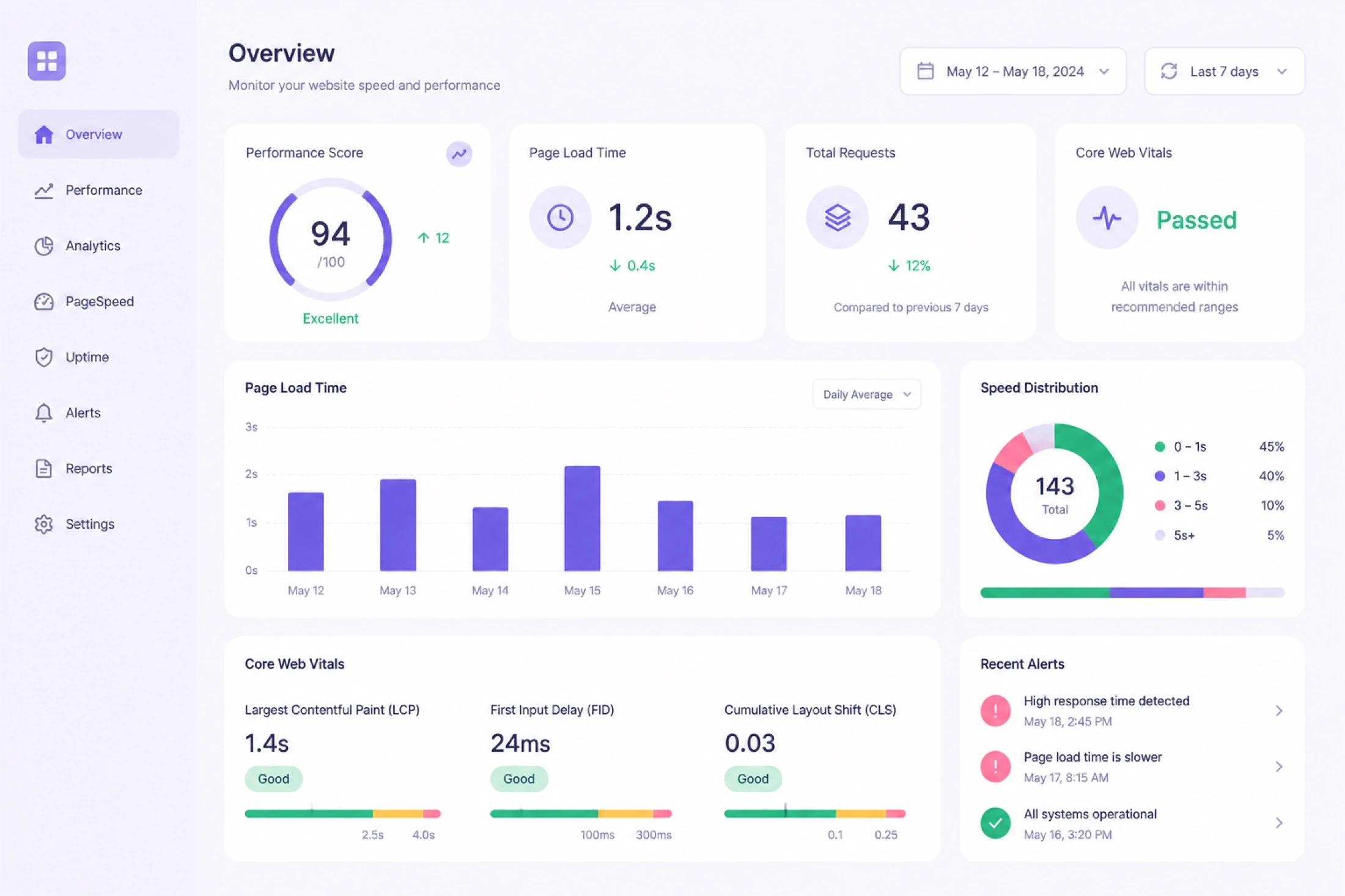
More CPU and RAM headroom on Business helps a WordPress site stay responsive when traffic spikes.
A cache plugin and a light theme still matter on Business the same way they do on Premium. Extra resources help, but they do not replace basic WordPress performance habits.
If your monthly visits already sit near the Premium allowance, moving to fast WordPress hosting on Business removes that ceiling before it becomes a visible slowdown for readers or shoppers.
Running a page speed test before and after the move gives you a real number instead of a guess. Save both reports so you can compare them again after a few weeks of live traffic.
Hostinger Business Plan Price vs Premium: What Changes at Checkout
Hostinger Business plan price vs Premium is a bigger jump than most buyers expect, and the gap shows clearly once you place both plans side by side on the same term.
The promo price on Business always looks reasonable during a sale window. The number that matters more is the renewal row sitting just below it on the same order summary.
Business costs more per month than Premium on every matching term, since you are paying for the added CPU, RAM, and backup frequency, not just a bigger marketing badge.
Term length changes the math too. A longer prepaid term usually narrows the percentage gap between Premium and Business, but the dollar difference still adds up over a full year.
Before you decide, choose Hostinger plan and term on a live cart, then write down both the promo total and the renewal total for Premium and Business together.
Currency and region also shift the exact numbers you see. A buyer in one country might find a narrower Business premium than a buyer checking out in another currency the same day.
Backups and Staging on the Hostinger Business Plan
Backups and staging on the Hostinger Business plan are the two features that quietly justify the higher renewal for sites that publish or sell every day.
Premium typically runs weekly backups, which is fine for a blog that posts occasionally. Business moves to daily backups, which matters far more once orders or comments arrive constantly.
A staging tool lets you test a theme change, a plugin update, or a redesign on a copy of your site before it ever touches the live version customers see.
- Daily automated backup snapshots instead of weekly ones
- One click restore points inside hPanel
- A staging environment for safer plugin and theme testing
- More resource headroom so backups do not slow down live traffic
If a broken update has ever cost you a full day of rebuilding, that alone can make Hostinger Business plan backups worth the price difference over Premium.
Restore points work from inside hPanel without a support ticket, which matters when a broken update happens late at night and you need the last clean version back quickly.
Test the restore flow once on a low traffic day so you already know the steps before an emergency ever forces you to learn them under pressure. A dry run costs almost nothing.
Buyers weighing this feature alone can compare Hostinger WordPress hosting plans and check the exact backup cadence listed for Business before switching from Premium.
Is Hostinger Business Good for WooCommerce Stores
Is Hostinger Business good for WooCommerce stores is one of the most common questions buyers ask once a hobby blog turns into a real storefront with paying customers.
WooCommerce adds constant database activity from carts, sessions, and order records, which uses more resources than a static blog page ever would on the same visit count.
The added CPU and RAM on Business help checkout stay fast during a sale or a product launch, when Premium can start to feel noticeably slower under the same load.
Daily backups also protect order and customer data that changes every hour on an active store, unlike a blog where a weekly backup often feels like enough.
Store owners weighing the switch can review WordPress hosting for WooCommerce requirements before locking in a plan and term for the new store.
A small catalog with light traffic can still run comfortably on Premium. Business earns its keep once order volume, plugins, and traffic all climb together.
WooCommerce extensions for shipping, tax, and subscriptions each add their own background processes. A store running several of these plugins uses more resources than the product count alone suggests.
Hostinger Business vs Premium: Websites, Storage, and Bandwidth Limits
Hostinger Business vs Premium comes down to a short list of limits that actually change how your WordPress site behaves once it grows past a small starting point.
Both plans support multiple websites, but Business gives a larger combined resource pool, so several active sites share more CPU and RAM without competing as tightly.
| What changes | Premium | More headroom Business |
|---|---|---|
| Websites | Multiple websites | Multiple websites, larger pool |
| CPU and RAM | Standard allowance | Higher allowance |
| Backup cadence | Weekly | Daily |
| Staging tools | Limited or none | Included |
| Free SSL | Included | Included |
Exact allowances change by region and promo window. Confirm live Hostinger checkout for your plan and term.
When storage or traffic already forces the choice, weigh Hostinger Premium vs Business against the renewal line instead of the feature list alone.
Reading the table this way keeps the decision simple. Count how many rows actually matter for your site today, then only pay for the tier that clears those specific rows.
Free Domain and SSL on the Hostinger Business Plan
Free domain and SSL on the Hostinger Business plan follow the same eligibility pattern as the rest of the lineup, so a coupon or upgrade does not automatically unlock either one.
Free SSL ships on Business the same way it does on Single and Premium, and it renews automatically once your site is connected, so it rarely needs manual attention.
A free domain is usually tied to a qualifying annual term rather than to the Business tier itself. Short terms and some regions may not include it at all.
Confirm the domain eligibility row on the order summary before you count it as savings. If that line is missing, the domain likely is not included on your term.
If a free domain year matters to your launch date, get WordPress hosting on a qualifying annual term and keep that row visible until payment completes.
SSL renews quietly in the background on eligible plans, so it rarely needs manual attention. The domain date is the one line worth writing on a calendar reminder.
Who Should Buy Hostinger Business for WordPress
Who should buy Hostinger Business for WordPress usually already has a site that is close to outgrowing Premium in a specific, noticeable way.
A WooCommerce store with steady daily orders is the clearest case, since checkout speed and daily backups both carry real weight once money moves through the site.
A content site with rising traffic from search or social also benefits, especially if pages have started loading noticeably slower during peak hours on a thinner plan.
Agencies running several client sites on one account often prefer the larger combined resource pool, so one busy client site does not slow down the others.
If any of that matches your project, buy WordPress hosting on Business and note the renewal date the same day you check out.
A membership site with gated courses is another good fit. Steady logins and file downloads use resources the same way a store does, even without a shopping cart involved.
A broader look at the full lineup sits inside the Hostinger WordPress hosting review if you want Single, Premium, and Business compared in one place.
Who Should Stay on Hostinger Premium Instead
Who should stay on Hostinger Premium instead includes anyone whose current site runs fine, loads quickly, and has not actually bumped into a real limit yet.
A single blog, a portfolio, or a brochure site for a local business rarely needs the extra CPU or the daily backup cadence that Business is built around.
Weekly backups are enough when content changes a few times a month rather than every hour, which describes most personal and small business sites early on.
When the choice is not obvious yet, compare Hostinger Premium vs Business against your actual traffic numbers instead of guessing from the plan page alone.
Paying for Business headroom you are not close to using is the most common way buyers overspend on WordPress hosting in the first year.
A freelancer with one portfolio site or a writer running a single niche blog almost always fits comfortably on Premium without ever feeling a resource ceiling.
If Premium already handles your traffic without a hint of slowdown, there is no rush to upgrade WordPress hosting to Business until a real number tells you otherwise.
Hostinger Business Plan Renewal Price Honesty
Hostinger Business plan renewal price honesty matters more here than on cheaper tiers, since the dollar gap between promo and renewal is larger to begin with.
Promo pricing on Business applies to the first term only. Once that term ends, the plan renews at the standard rate shown on the same order summary you saw at checkout.
Write the renewal price as a monthly figure even if you paid annually. It makes the real cost easier to compare against ad spend, plugins, and other running expenses.
Add domain renewal once any free first year ends, plus any premium plugins your store or site depends on, into the same year two budget line.
More plan and pricing comparisons live on the wordpress hosting homepage if you want a wider shortlist before locking in your year two numbers.
hPanel lists your subscription and renewal date under billing once you are live. Check it once a quarter so the renewal figure never comes as a surprise.
A simple spreadsheet with hosting, domain, and any premium plugins in one column keeps year two from feeling like a surprise invoice when the first renewal notice arrives.
Common Mistakes Buying Hostinger Business for WordPress
Common mistakes buying Hostinger Business for WordPress start with upgrading from Premium before confirming which specific limit actually caused the problem.
Buyers also assume Business fixes a slow site on its own. A bloated theme or too many plugins will still slow down a site on any tier, Business included.
Comparing unequal terms is another common error, such as a 48 month Business quote against a 12 month Premium quote, which makes the gap look smaller than it is.
Skipping the domain eligibility check is a smaller but real mistake. Not every Business term includes a free domain, and the order summary is the only place that confirms it.
More plan comparisons and current listings for different budgets sit inside the WordPress hosting blog if you want to check more than Business before deciding.
Delaying installation after a successful checkout wastes momentum too. Install WordPress the same day and move your staging test into the live site while details are fresh.
Ignoring the CPU and RAM numbers on the plan page is another quiet mistake. Match them against your current hPanel usage instead of upgrading on a feeling alone.
Hostinger Business Plan Checkout Steps for WordPress
Hostinger Business plan checkout steps for WordPress are short once you know what each row on the order summary actually means.
- Open a current Hostinger Business offer link.
- Confirm the plan name reads Business, not Premium.
- Pick a billing term that matches your budget and site plan.
- Check the domain eligibility row before adding a domain.
- Read the promo total and the renewal total together.
- Complete payment, then install WordPress the same day.
- Set up a staging copy before your first big change.
Screenshot the order summary the moment it shows your final total. That image becomes useful proof if a support ticket ever needs it later.
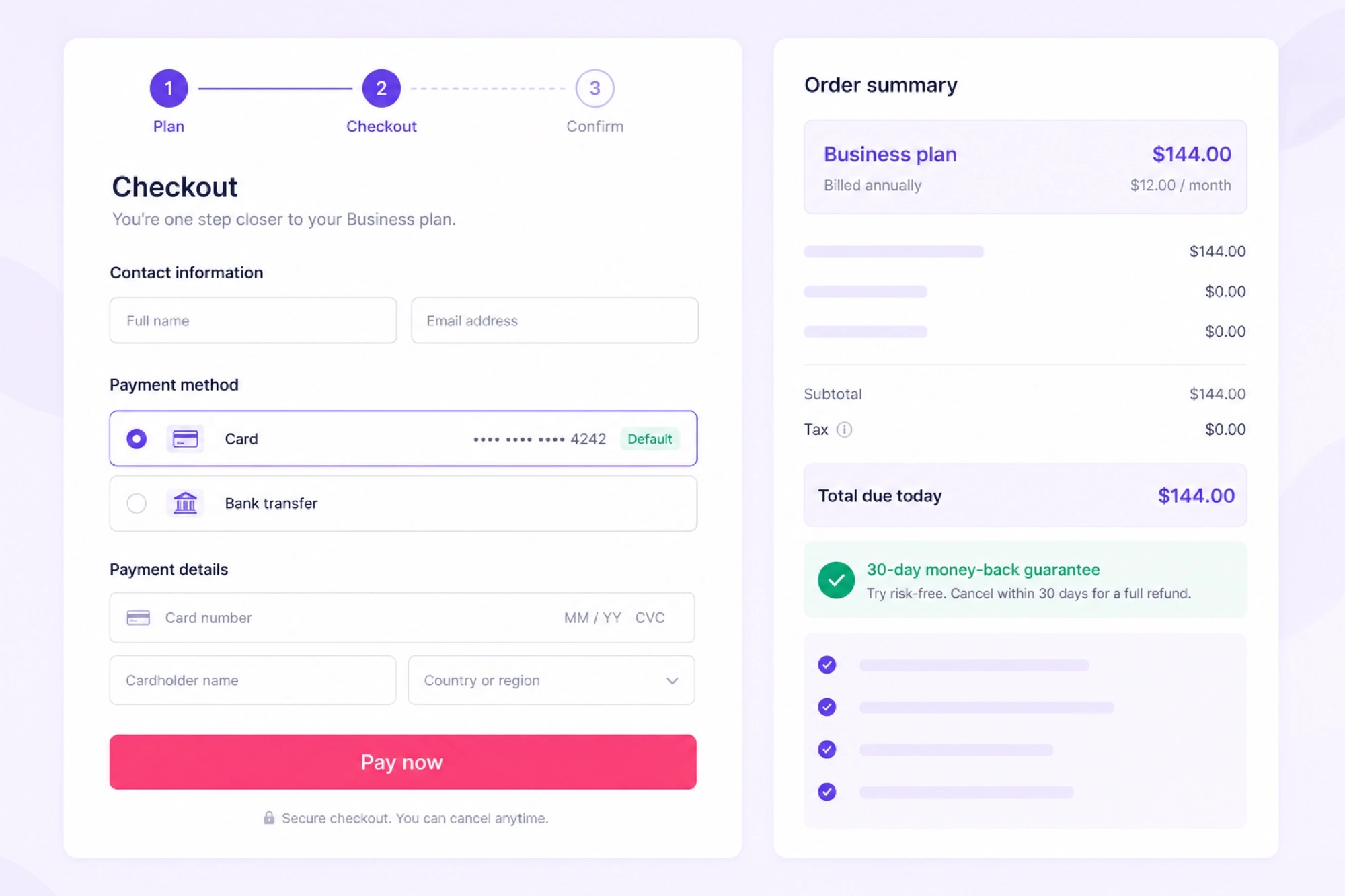
Confirm plan name, term, promo total, and renewal price on this screen before you pay.
Once WordPress is installed, connect the staging tool before you install a single plugin. That habit protects the live site from your very first mistake on the new plan.
When every line matches what you planned, complete WordPress hosting checkout and save the confirmation email for later reference.
Hostinger Business Plan for High Traffic WordPress Blogs
Hostinger Business plan for high traffic WordPress blogs solves a specific problem: pages that used to load fine start slowing down once visits climb past a certain point.
The higher monthly visit allowance on Business gives a blog more room before it approaches any soft resource ceiling that Premium might hit first.
Extra CPU cores help most during traffic spikes, such as a post going viral on social media or a page ranking suddenly on the first search results.
A cache plugin, an image optimizer, and a lightweight theme still do most of the heavy lifting. Business gives them more room to work well under pressure.
If your analytics already show a steady upward trend, secure WordPress hosting on Business before the next spike rather than during it.
A content delivery network on top of Business helps images and static files load quickly for visitors far from your server region, which matters more as traffic spreads globally.
Hostinger Business Plan Review for WordPress FAQ
These are the questions buyers ask most before deciding whether Business is worth the higher renewal over Premium.
Each answer below matches the same checkout and resource details covered earlier, written short so you can scan them quickly.
Bookmark this section if you tend to compare more than one plan before buying, since these same questions come up across almost every Hostinger Business decision.
What does the Hostinger Business plan add for WordPress that Premium does not?
Business adds more CPU and RAM headroom, a higher monthly visit allowance, daily backups instead of weekly ones, and staging tools, on top of everything Premium already includes for a WordPress site.
Is Hostinger Business fast enough for a WordPress site with real traffic?
Yes for most content sites and small stores. The plan gives more resources than Premium, so pages stay responsive during normal traffic growth, though a good cache plugin and light theme still matter.
Does Hostinger Business include daily backups for WordPress?
Business plans typically include daily backups, which is a meaningful upgrade over the weekly backup cadence on lower tiers, and it matters most for stores or sites that change content often.
Is the Hostinger Business plan worth it for a WooCommerce store?
For a store with real orders, yes. The extra CPU and RAM handle checkout and cart activity better than Premium, and daily backups protect order data that changes every day.
How much does Hostinger Business cost after the first term renews?
Renewal always sits higher than the promo price shown at checkout. Open a live offer link and read the renewal row on the order summary before you commit to a term.
Can I use Hostinger Business for more than one WordPress website?
Yes, Business supports multiple websites like Premium does, but with a larger combined resource pool, which helps if you run several sites that each see steady daily visitors.
Should I upgrade from Premium to Business right now?
Only if a specific limit is already causing problems, such as slow load times during traffic spikes, a store outgrowing Premium, or backups you need daily instead of weekly.
Does Hostinger Business include a free domain and SSL for WordPress?
Free SSL is included on Business like other tiers. A free domain is commonly available on qualifying annual terms, so confirm that eligibility row on checkout before you pay.
Final Verdict: Should You Buy Hostinger Business for WordPress
Hostinger Business for WordPress earns its higher renewal only when a specific limit on Premium is already visible in your traffic, your orders, or your backup needs.
A store with daily orders, a blog with rising traffic, or an agency juggling several active sites all put the extra CPU, RAM, and daily backups to real use quickly.
A quiet blog, a single portfolio, or a brochure site rarely needs that headroom yet, and Premium usually covers those projects without pushing the renewal higher than it needs to be.
Whichever tier fits, run the same habit every time: open a live cart, place Premium and Business side by side, and read the renewal line before any coupon claim counts as real savings.
Keep the checkout screenshot and the renewal date somewhere you will actually see them again. That single habit protects your budget more than any feature list ever will.
When your traffic, orders, or backup needs already point to Business, start WordPress hosting on that tier and install WordPress the same day your checkout confirms.